





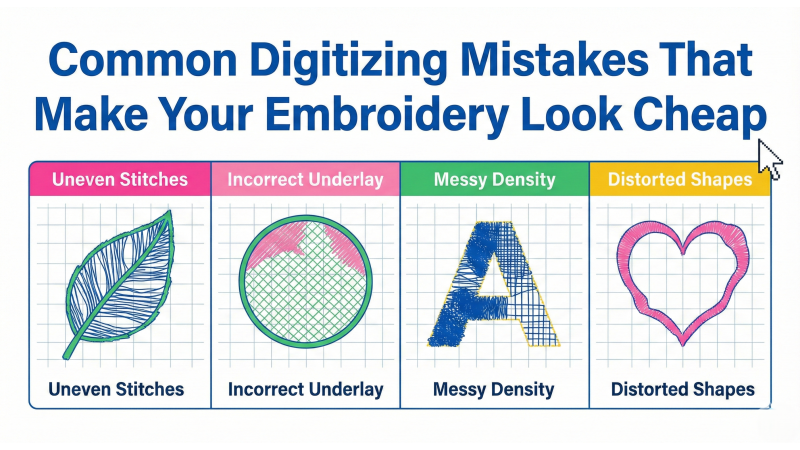
Common Digitizing Mistakes That Make Your Embroidery Look Cheap
Even the most elegant artwork can unravel into rough, uneven embroidery when the digitizing behind it is flawed. Many beginners—and even seasoned digitizers—accidentally introduce technical errors that weaken the final stitch-out. This expanded guide explores the most common issues that cause embroidery to look low-quality and how to fix them with smarter digitizing decisions. For more clean, production-ready design resources, visit EmbDesignTube.
1. Using Incorrect Stitch Density
Density is the backbone of embroidery quality. Designs that are too dense feel stiff, cause thread breaks, and distort fabric. Designs that are too loose appear patchy or washed out.
Fix:
- Select density based on fabric, stitch type, and layer thickness.
- Reduce density in areas where fills overlap.
- Always stitch a small sample before final production.
2. No or Wrong Underlay
Underlay acts as the scaffolding beneath embroidery. Without it, top stitches sink into the fabric, edges look fuzzy, and the finish appears cheap.
Fix:
- Use edge-run underlay for satin borders.
- Choose zigzag or double-zigzag for wide satin areas.
- Apply tatami underlay for large fills.
For deeper understanding of how professionals build clean foundations, explore how stabilizing strategies affect digitizing by reviewing real-world examples in this detailed breakdown.
3. Incorrect Pull Compensation
Embroidery naturally contracts as it sews. Without adjusting for this pull, outlines drift, letters appear narrower, and shapes distort.
Fix: Add pull compensation depending on fabric stretch, density, and stitch type.

4. Poor Pathing Choices
Pathing determines how the needle travels across your design. When done poorly, it causes extra trims, jumps, and stops—each leaving behind tiny scars that make the embroidery appear unpolished.
Fix:
- Plan a smooth sequence from first stitch to last.
- Minimize unnecessary color breaks.
- Avoid jump-heavy sequencing.
To see how experts plan clean sequencing, check out this helpful visual explanation in this tutorial breakdown.
5. Using the Wrong Stitch Type for the Shape
Each stitch type serves a purpose. When misapplied, the design loses clarity and texture.
Fix:
- Use satin for narrow shapes and borders.
- Use tatami/fill for large or wide objects.
- Use run stitches for fine detail and micro-lettering.
6. Ignoring Fabric Type and Stretch
A design digitized for heavy canvas cannot be stitched on stretchy jersey without adjustments. Fabric choice dictates stabilizer, density, underlay, and pull compensation.
Fix:
- Digitize specifically for the intended fabric.
- Use cut-away on knits and stretchy fabrics.
- Use tear-away on stable woven materials.
7. Incorrect Stitch Angle
Uniform angles create flat, lifeless fills. Uneven or poorly chosen angles may cause streaks, lumps, or misaligned textures.
Fix:
- Vary angles by 10°–25° within sections.
- Follow the curvature of natural shapes.
- Use curved fills where applicable.
8. Overlapping Objects Without Planning
Random overlaps create thickness issues, fabric distortion, and stray outlines peeking from beneath other elements.
Fix:
- Plan entry and exit points with intention.
- Trim hidden layers rather than stacking them.
- Maintain logical layering sequences.
9. Digitizing Tiny Text Incorrectly
Small lettering is where embroidery can either impress—or fail. Overly dense, improperly spaced, or poorly chosen stitches cause letters to blur or close up.
Fix:
- Use run stitches for micro text.
- Avoid satin stitches below 4–5 mm.
- Shorten stitch length and reduce density where needed.
10. Not Testing the File Before Sending to Clients
On-screen previews can be deceiving. Issues like tension imbalance, looping, or inaccurate pathing often become visible only during real stitching.
Fix: Always run a physical sew-out—or at least a virtual simulation—to verify quality before delivery.
Conclusion
Cheap-looking embroidery is almost always the result of avoidable digitizing mistakes. When you refine density, pathing, stitch angles, underlay, and compensation, the design transforms from amateurish to professional. Careful planning paired with thoughtful testing ensures clean, durable, and production-ready results.
For more digitizing help, cleaner workflows, and high-quality ready-made embroidery files, visit EmbDesignTube.
Related Products
Leave a comment