





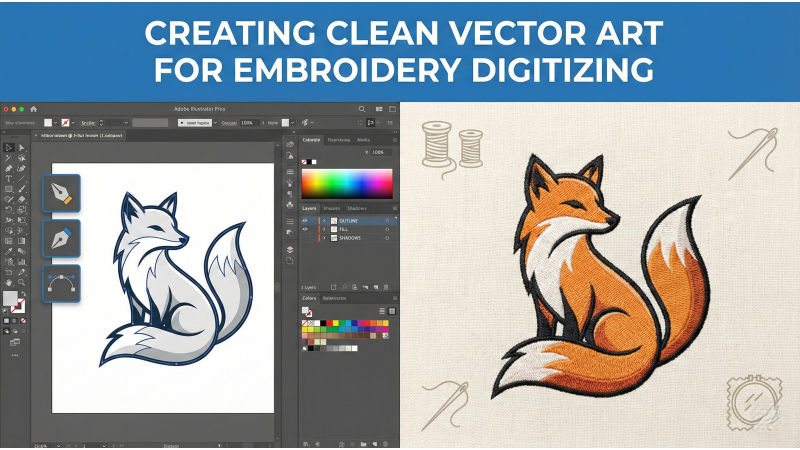
Creating Clean Vector Art for Embroidery Digitizing
Embroidery digitizing begins long before the first stitch drops. It starts in the quiet workshop of vector artwork — where shapes behave, lines stay loyal, and every curve follows a predictable rhythm. Clean vector art is the invisible scaffolding that holds a flawless embroidery file together. When your artwork is tidy, simplified, and thoughtfully structured, digitizing becomes less guesswork and more choreography.
To understand why vector clarity matters so much, it helps to look at real production behavior. For example, watching practical breakdowns like those shown in this detailed embroidery workflow video reveals how clean outlines and simplified shapes translate directly into smoother stitching. The machine doesn’t interpret “artistic messiness” — it follows paths as strictly as a train follows its tracks.
Why Vector Art Matters for Digitizing
Embroidery machines don’t see colors and shapes the way humans do. They only see paths — long, tiny, and everything between. When artwork is cluttered with stray points, sloppy outlines, or unnecessary details, the digitizer must wrestle through chaos before assigning proper stitch types. Clean vector graphics, however, scale elegantly, modify easily, and remain consistent throughout every step of digitizing. Videos like this stitch-structure tutorial illustrate how well-prepared artwork dramatically reduces distortion during stitching.
For beginners and professionals alike, reviewing foundational guidance such as the embroidery preparation rules outlined in Printify’s embroidery design preparation guide can help clarify what makes artwork suitable for thread-based reproduction.

1. Simplify Artwork Before Digitizing
Thread behaves like a tiny nomad — it prefers bold territories, not tiny or overly detailed landscapes. Gradients, soft shadows, micro textures, and overlapping vector clusters rarely translate well in stitches. Simplify shapes, merge layers, and limit the design to clear, embroidery-friendly elements. Clean simplification helps your artwork behave consistently when translated into stitch angles, as demonstrated in this visual digitizing breakdown.
2. Use Consistent Stroke Weights
Embroidery doesn’t recognize thin ink strokes. What appears as a crisp line in vector art may vanish completely once stitched. Threads need thickness to stay visible and stable. In most cases, lines must be converted into satin columns at least 3 mm wide. Maintaining consistent stroke weight ensures you avoid accidental disappearing lines or disproportionately thick borders later.
3. Remove Irregular Nodes and Clean Outlines
Vector files born from auto-tracing tools often carry hundreds of chaotic nodes — crooked, jittery, and unfriendly. These produce jagged stitch paths and messy results. Removing unnecessary points and smoothing curves creates cleaner, more predictable stitch flow. Many digitizers swear by this step, because it reduces distortion and trims production time.
4. Convert Strokes to Shapes
Embroidery needs filled shapes, not hollow outlines. Every stroke must be expanded into a closed shape so a digitizer can assign satin, fill, or running stitch types. This is also where you refine thickness, adjust proportions, and ensure the design remains balanced. It’s a small step with a massive effect on stitch accuracy.
5. Organize Layers and Color Groups
A well-organized vector file behaves like a calm map rather than a labyrinth. Group similar colors, remove duplicates, and label sections logically. Proper grouping supports the digitizer’s workflow and dramatically reduces errors in sequencing, density planning, and underlay placement.
6. Avoid Extremely Small Details
Thread is not a pixel. Small dots, hairline curls, and micro patterns can cause thread breaks, fuzziness, or simply vanish after stitching. If your design contains tiny decorative bits, replace them with bold shapes or remove them. Embroidery thrives on clarity, not miniature features.
7. Maintain Smooth Curves and Balanced Shapes
When outlines wobble, stitches wobble. Curves must be smooth and intentional so the digitizer can assign stitch angles that flow naturally. Shapes that feel balanced and consistent lead to cleaner embroidery, fewer distortions, and harmonious density across regions.
8. Limit the Color Count
Each color change requires time, recalibration, and sometimes trimming. Too many colors create unnecessary machine stops and increase production cost. Reduce colors to the minimum needed for clarity. If the artwork feels cluttered, merge similar tones into unified color regions.
9. Ensure Artwork Is Scalable
Vector art scales perfectly — embroidery does not. A design that looks balanced at 8 inches may fall apart at 2 inches. Prepare artwork that maintains its visual integrity at various sizes. Principles like those discussed in this embroidery guideline article can help you understand scaling limits, push-pull behavior, and how thread density changes with size.
10. Export in Proper Vector Formats
Digitizers work best with clean, editable formats such as AI, EPS, SVG, or PDF. Avoid low-resolution PNGs or JPEGs — they require retracing and often introduce errors. A well-prepared vector file means the digitizer spends more time refining stitch paths rather than rebuilding artwork from scratch.
Conclusion
Clean vector art is the first act of embroidery excellence. Simplifying shapes, smoothing outlines, managing layers thoughtfully, and exporting proper vector formats ensures your digitizer can create files that stitch beautifully and efficiently. Whether you're preparing artwork for commercial apparel, patches, or high-detail logos, starting with clean vector art saves time, reduces mistakes, and guarantees better stitch quality. Thoughtful preparation becomes visible in every thread — a quiet, disciplined craft revealed in the final embroidered result.
Related Products
Leave a comment