





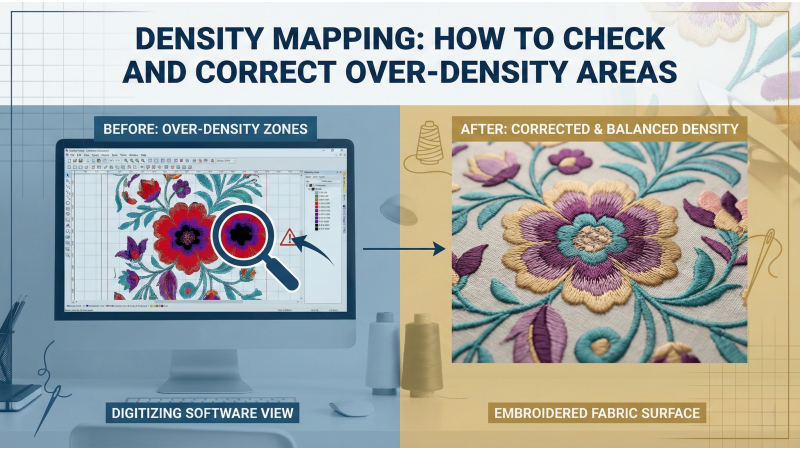
Density Mapping: How to Check and Correct Over-Density Areas
Over-density is one of the most common causes of thread breaks, needle deflection, puckering, and distorted embroidery. When too many stitches fall into a small area, the fabric becomes overloaded, making the design difficult to sew and often damaging both the project and the machine. Density mapping is the most effective way to detect and correct excessive stitch buildup before production—and when combined with the right hooping, stabilizer, underlay and machine settings it will save you time, thread, and headaches.
What is Density Mapping?
Density mapping is a digitizing technique and software feature that visualizes the stitch density of a design. It usually highlights problem zones with a color-coded map so you can see where stitches are too heavy, too light, or unevenly distributed. This visualization is the first line of defense: instead of guessing where trouble might occur, you can see exactly which regions will likely cause thread breaks or puckering.
For a clear, practical walkthrough of using density maps and interpreting what the colors mean during a true stitch-out, this video shows software visualization tools and real stitch comparisons so you can translate what you see on-screen into a correct test plan. Watch the density-map vs stitch-out demo.
Why Over-Density Happens
There are several common causes:
- Resizing designs without re-evaluating density — small artwork enlarged without density adjustment becomes overly packed.
- Poor source digitizing — designs imported from low-quality digitizers often have hidden overlaps and duplicated stitches.
- Overlapping elements such as appliqués, shading runs, or multiple fills stacked on top of each other.
- Excessive underlay or underlay types that add more stitches than the fabric or stabilizer can handle.
- Small details that the fabric cannot reliably reproduce; the digitizer tries to add stitches to force detail, increasing density.
If you want a practical guide that lists typical causes, shows stitch-count examples, and gives real-world fixes for over-dense designs, the article on Lindeeg Embroidery provides a helpful checklist and sample fixes you can apply immediately. 7 ways to deal with overly dense designs.
Common Problems Caused by Over-Density
When density is too high, machines struggle to penetrate the fabric repeatedly. Typical failures include:
- Thread breaks and needle breaks
- Puckering and permanent distortion of the fabric
- Crushed or missing detail where outlines fail to stand out
- Stiff, bulky embroidery that does not drape naturally
Machine-operator errors (running dense designs at full speed) amplify these problems—slowing the run and checking tension can make a big difference.

How to Use Density Mapping in Digitizing Software
Most professional digitizing suites include a density map or density-report function. Use these steps:
- Open the density map and visually scan for high-density zones (often shown in dark or warm colors).
- Select problem areas and inspect stitch types, underlay, and overlaps.
- Make conservative adjustments (reduce density, remove hidden stitches, change stitch type) and recheck the map.
- Export a test file and run a real stitch-out on the same fabric and stabilizer you intend to use.
The Wilcom documentation gives a solid technical description of how stitch-density adjustments work inside a professional package and how to evaluate density numerically and visually. If you use Wilcom, that help page is a reliable reference for tweaking density parameters and understanding their effect. Wilcom: Adjusting stitch densities.
Checking Density in Satin Stitches
Satin columns are especially prone to density issues because they create thick stitch runs. When too many satin columns sit close together, or when columns are made too narrow with very tight step-over, the effective stitch coverage skyrockets.
Practical satin fixes:
- Increase stitch length slightly for wider columns to reduce stitch count.
- Convert very wide satins to a filled, textured stitch where appropriate.
- Use balanced compensation and underlay (edge-walk or a minimal zigzag) to stabilize without adding too many stitches.
For a real-world demo showing satin columns and how density choices affect snagging and sheen, this video stitches satin columns with varying densities so you can see the differences close-up. Satin density stitch-out comparison.
Checking Density in Fill Stitches
Fill stitches cover large areas and can become over-dense if spacing is set too tight or when multiple adjacent fills are layered. When fills overlap, remove hidden stitches under the top layer and adjust row spacing to reduce the total stitch count.
Techniques for fills:
- Use cross-hatch or patterned fills with slightly wider spacing for lightweight fabrics.
- Stagger pathing to avoid long, parallel rows that concentrate stress in one area.
- Where shading is needed, consider halftone fills (lighter density) rather than multiple heavy fills stacked on top.
This video walks through converting heavy fills into lighter, more efficient fill patterns and shows stitch-outs so you can compare coverage and stability. Fill-pattern conversion & test stitch-out.
Correcting Overlapping Elements
Overlapping elements—appliqués, trims, shading layers—often introduce hidden stitches that add density without improving the visible design. Use these methods:
- Remove hidden stitches beneath upper layers (automatic overlap removing tools are available in many apps).
- Combine adjacent fills into a single optimized object when possible, then reintroduce pathing for aesthetic control.
- Plan the stitch order so top layers cover what’s needed and don’t require extra underlay beneath them.
DigitizingUSA has a helpful guide explaining how stitch density behaves when objects overlap and best practices for removing unnecessary stitches. Their article presents examples of overlap removal and when to use it. Stitch density in digitizing (DigitizingUSA).
Adjusting Underlay to Reduce Density
Underlay provides support but can contribute to density if overused. For delicate fabrics, light underlays (edge-walk or a single zigzag) provide stability without adding too many stitches. For heavier fabrics you can use stronger underlays but still avoid duplicating underlay types across stacked objects.
Underlay checklist:
- Edge-walk underlay for satin edges
- Single zigzag or cross-hatch underlay for large fills (avoid multiple dense underlays)
- Minimal underlay for appliqués when a heavy stabilizer is used
For more on stitch density basics and how underlays interact with density choices, Machine Embroidery Geek provides a plain-language walkthrough of stitch density concepts and the formulas people typically use to calculate safe densities for different fabrics. What is stitch density? (MachineEmbroideryGeek).
Choosing the Right Density for Different Fabrics
Every fabric tolerates density differently:
- Knits & stretch fabrics: use lighter densities, wider stitch spacing, and cut-away stabilizer.
- Lightweight woven: moderate density, light underlay, and secure hooping.
- Heavy fabrics (denim, canvas): higher densities are acceptable but watch for thread breakage from coarse needles or wrong thread choice.
Always test stitch-outs on the actual production fabric; visual density maps are a prediction but the real fabric behavior tells the final story. For an example of fabric-specific density choices and hooping recommendations, this tutorial demonstrates test stitch-outs on three different fabrics and explains which density choices worked best for each. Fabric-specific density test stitch-outs.
Stabilizer Choice and Hooping Technique
A strong stabilizer supports dense stitching and prevents shifting. Cut-away stabilizer often works best for high-density areas because it remains stable under pressure. Proper hooping keeps the fabric taut and reduces the risk of puckering, allowing the design to sew smoothly even at higher densities.
Stabilizer tips:
- Use cut-away for knits and most high-density designs.
- Consider adhesive spray or stabilizer tape for tricky garments and small items.
- Hoop with adequate tension and check that the stabilizer and fabric sit flat together before sewing.
For a demonstration tying stabilizer choices to density outcomes (including hooped vs. non-hooped comparisons), watch this stitch-out that tests several stabilizers and hooping techniques on one design. Stabilizer & hooping tests for dense designs.
Machine Speed and Tension Adjustments
Sewing dense designs at full speed increases friction and heat, which can lead to thread breaks and needle problems. Slowing the machine in dense regions, or reducing machine RPM when the design switches to heavy areas, helps the thread glide more smoothly. Lower top tension in tricky spots and use a slightly heavier needle if necessary—small machine-side changes are often the difference between a good run and a wreck.
A detailed, practical video about machine settings, tension tuning and speed handling for dense designs shows how operators can adapt while a job runs to reduce breaks and maintain quality. It’s a great companion to density-map-based adjustments. Tip: use speed/tension with density maps.
Testing Stitch-Outs and Final Adjustments
After adjusting density and underlay settings, always run a test stitch-out to evaluate results. Look for smooth coverage, clean edges, stable fabric, and no thread breaks. If problems persist, iterate: reduce density incrementally, remove unnecessary overlaps, and re-test. Maintain a test-swatches log with photos, fabric, stabilizer, machine settings, and the final verdict—this will save time on future jobs.
If you want a concise technical read that explains stitch-density numerics, how the numbers translate into real-world coverage, and when to change density values rather than stitch type, the Wilcom documentation (above) and DigitizingUSA’s article are excellent references to keep handy while you test. For another accessible explanation of density and how many stitches per millimeter different stitch types typically use, revisit the DigitizingUSA resource. Stitch density guide (DigitizingUSA).
Automated Tools vs Manual Inspection
Many modern suites include automatic density checkers and overlap removal tools. These are fast and useful, but never depend on automation alone. Always inspect the density map visually, preview the stitch order, and if possible, run a small stitched sample. Automatic tools can miss context—like a decorative textured fill that intentionally has higher density for effect—so use automation as an assistant, not a replacement for judgement.
For a balanced discussion of when automated density fixes work and when manual digitizing is still superior, this article lays out the limits of auto-tools and offers tips for manual edits that preserve design intent. Automation vs manual edits (Lindeeg).
Conclusion
Density mapping is a vital digitizing technique for preventing over-density issues that lead to thread breaks, distortion, and fabric damage. By analyzing stitch distribution, adjusting density values, removing unnecessary overlaps, and selecting the right stabilizers and machine settings, embroiderers can achieve clean, professional-quality results. Practical testing—stitching small swatches, documenting outcomes, and iterating—is the most reliable path to consistent production runs.
Related Products
Leave a comment