





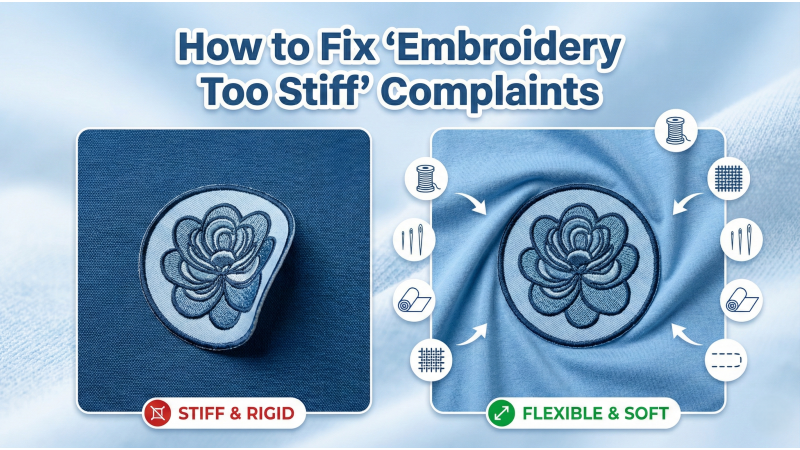
How to Fix “Embroidery Too Stiff” Complaints
“Why does this embroidery feel so hard?” — this is one of the most common complaints many embroiderers encounter. Whether it’s a T-shirt, polo, hoodie, or kidswear, stiff embroidery instantly reduces comfort and customer satisfaction. The good news? Stiffness is not permanent — it’s fixable. And most importantly, it is preventable.
Embroidery stiffness comes from digitizing decisions, stabilizer selection, stitch density, fabric type, and the way all these elements interact. Soft embroidery is created through balance — not by chance. In this extended guide, we break down every reason behind “too stiff” embroidery and provide professional-level solutions. To deepen your understanding, you can also study common embroidery mistakes highlighted in resources like this detailed hand-embroidery mistake guide, which applies surprisingly well to machine embroidery too.
1. Density Is Too High for the Fabric
Density is the #1 cause of stiff embroidery. When density is too tight, stitches stack and compress the fabric, forming a thick, rigid layer that feels heavy and board-like. Thin fabrics like jersey knits, cotton tees, and rib materials show stiffness instantly when over-packed with stitches.
Fix:
- Reduce density in large fill areas.
- Use lighter densities for soft or stretchy fabrics.
- Open density slightly for performance materials and athletic wear.
- Test the design on the actual garment before production.
Even beginner-friendly videos such as this simple machine embroidery guide can help you visually understand how density affects texture.
2. Wrong Underlay Creates Extra Bulk
Underlay supports embroidery, but the wrong type can make the design extremely stiff — even before the top stitches are applied. Heavy zigzag underlay, doubled center-walks, or unnecessary layering all contribute to thickness.
Fix:
- Use edge-walk underlay for satin stitches.
- Use light tatami or a single center-walk for filled areas.
- Avoid double underlay unless the fabric is thick (hoodies, canvas).
- Shorten underlay stitch length on soft garments.
This issue is also highlighted in troubleshooting FAQs like Brother’s stabilizer and embroidery support page, which explains how foundation stitching impacts fabric behavior.
3. Using Too Many Stabilizer Layers
Stabilizers prevent distortion — but using too many makes garments feel uncomfortable and stiff from the inside. Multiple tear-away layers or thick, dense backings can make the embroidery feel like cardboard.
Fix:
- Use the correct stabilizer (cutaway for knits, tear-away for sturdy woven fabrics).
- Avoid stacking stabilizers “just in case.”
- Trim stabilizer close to the design for softness.
- Use no-show mesh for high-comfort garments like babywear and T-shirts.
To understand stabilizer behavior visually, watch a clear explanation such as this stabilizer comparison demonstration.
4. Fabric Not Suitable for Heavy Stitching
Sometimes the artwork simply doesn’t match the garment. Light, stretchy, or thin fabrics cannot support dense fill blocks or large heavy logos. When the artwork is too demanding, the result will always be stiffness.
Fix:
- Simplify artwork for thin fabrics — use outlines or open fills.
- Create separate versions for jackets vs. T-shirts.
- Educate customers about fabric limitations.
- Reduce saturation for any logo intended for soft garments.
For visual examples, this embroidery fabric-handling tutorial demonstrates how fabric choice affects final results.

5. Too Much Satin in Large Areas
Satin stitches are smooth and shiny — but only when used within the correct size limits. When digitizers use satin for large shapes, the result becomes thick, raised, and stiff. Satin also requires strong underlay, which doubles the bulk.
Fix:
- Convert large areas to tatami fill.
- Use hybrid stitching — satin border + tatami inside.
- Reserve satin for small to medium shapes.
- Adjust density to maintain flexibility.
A great video explaining satin vs. fill behavior can be seen at this stitch-type breakdown tutorial.
Why Soft Embroidery Matters
Soft embroidery improves comfort, wearability, and customer satisfaction. Stiff designs rub against the skin, feel low-quality, and reduce garment flexibility. In today’s competitive embroidery market, customers expect professional, light, and comfortable stitching.
Common Misunderstandings About Stiffness
Many beginners believe that density alone is responsible. In reality, stiffness is a combination of:
- Digitizing settings
- Stabilizer type
- Underlay style
- Thread type
- Needle size
- Fabric behavior
- Stitch type selection
Beginner-friendly correction videos like this mistake explanation guide help clarify how small decisions affect overall softness.
Professional Tips for Consistently Soft Embroidery
- Always test-stitch on the real garment.
- Use 65/9 needles for lightweight fabrics.
- Reduce pull compensation to avoid unnecessary bulk.
- Use soft bobbin thread for better drape.
- Prefer light stabilizers when comfort is a priority.
- Convert dense shapes to motifs or open fills.
- Avoid oversized logos on thin garments.
- Guide clients about fabric suitability.
Final Tip
Soft embroidery isn’t achieved by simply reducing stitch count. It is the result of balanced digitizing: proper density, correct underlay, appropriate stabilizer selection, and fabric-specific adjustments. When you combine all these methods — along with insights from helpful tutorials such as this stabilizer and stability demonstration — you can completely eliminate “too stiff” complaints and deliver professional, wearable embroidery every time.
Leave a comment