





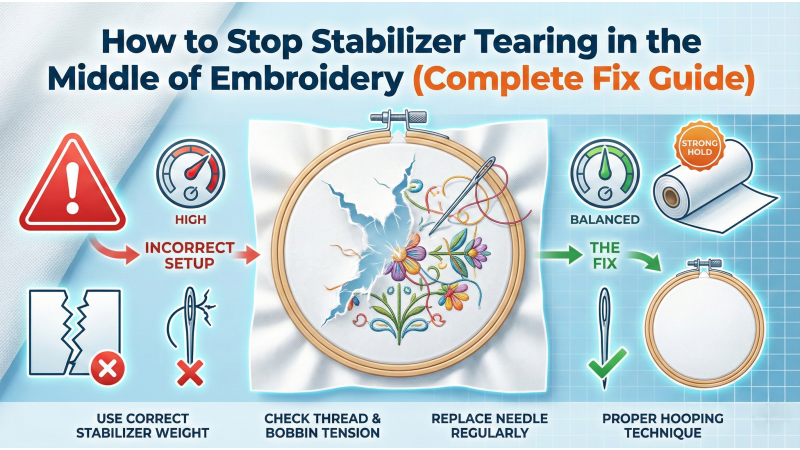
How to Stop Stabilizer Tearing in the Middle of Embroidery
Stabilizer tearing is one of those unpredictable interruptions that can turn a smooth embroidery session into a rescue mission. Everything begins perfectly — the fabric is hooped neatly, the needle drops gracefully, the machine hums in rhythm. Then, like a crack forming in ice, the stabilizer suddenly rips. The fabric shifts, stitches distort, outlines misalign, and the entire design falls apart mid-process.
Fortunately, stabilizer tearing isn’t a mystery. It’s a signal — a warning that your design, fabric, stabilizer, and machine are not working together in harmony. Understanding that balance is the key to preventing tears, ensuring cleaner results, and protecting your machine from unnecessary strain. If you’re completely new to stabilizer foundations, the OESD Stabilizer Basics Guide offers an excellent overview of stabilizer types and their intended uses.
Why Stabilizer Tears During Embroidery
Stabilizer tearing does not occur randomly — it’s always the result of an imbalance somewhere in the setup. Improper hooping, incorrect stabilizer type, overly dense designs, or fabric stretch can all contribute to sudden ripping. If you want to start with general stabilizer selection principles, Urban Threads’ stabilizer choosing guide gives a highly practical framework.
The most common causes include:
- Poor hooping technique or fabric not pulled firmly
- Using a weak or incorrect stabilizer for the fabric type
- Excessive stitch density in certain design segments
- Fabric shifting inside the hoop during heavy stitching
- No underlay or improper underlay structure
- High machine speed causing vibration and pull tension
Fabric movement is also a hidden culprit. If the material shifts even slightly, the stabilizer absorbs the entire pull force. You can also explore how stabilizer interacts with different fabrics in WeAllSew’s stabilizer tips, which offer additional insight on material behavior.
How to Stop Stabilizer from Tearing (Guaranteed Fixes)
1. Use a Stronger Stabilizer
Weak stabilizers are the #1 cause of mid-design ripping. Heavy designs, dense fills, and stretchy fabrics place enormous tension on the backing. High-GSM cut-away stabilizers distribute pressure more evenly and remain intact even during intense stitching.
When dealing with problem fabrics or heavy stitch regions, refer to the layered approach mentioned in Urban Threads’ stabilizer-hiding tutorial, which also demonstrates how proper stabilizer support improves design appearance.
- Use medium-to-heavy cut-away stabilizers for knits and stretch fabrics
- Use tear-away only for stable woven materials
- Add extra layers for dense designs or large motifs
- Choose fusible stabilizers when additional strength is required
2. Hoop Stabilizer and Fabric Tightly
Loose hooping instantly creates stress points. When the machine begins stitching, the needle drag pulls the fabric, and the stabilizer collapses at the weakest spot.
- Hoop fabric and stabilizer together when possible
- Ensure the material is firm and wrinkle-free
- Tighten hoop screws manually for a more secure grasp
- Use clips for slippery fabrics
Many embroiderers misinterpret skipped stitches as machine problems when the real issue is hooping stability. If skipped stitches accompany stabilizer stress, this WeAllSew skip-stitch troubleshooting guide can help identify related needle or tension factors.
3. Reduce Design Density
Designs with excessive density create a “compression zone” that pulls the stabilizer inward. Dense fills, thick satin borders, or layered stitching can easily overwhelm lightweight stabilizers.
- Lighten fill densities in digitizing software
- Add zigzag or edge-run underlay for balance
- Avoid overlapping multiple fills unless absolutely needed
- Ensure your design matches the fabric type

4. Add a Second Layer of Stabilizer
This is one of the simplest, most effective solutions. Cross-layering (one layer horizontal, one vertical) significantly increases tear resistance.
- Layer stabilizers in opposite grain directions
- Combine cut-away + tear-away for structured fabrics
- Use adhesive layers for slick textiles
5. Slow Down Your Machine Speed
High-speed stitching increases penetration force. The faster the needle hits the stabilizer, the more stress it endures, especially during dense fills.
- 500–650 SPM for dense designs
- 450–600 SPM for stretch fabrics
- 600–750 SPM for stable woven materials
For visual learners, this YouTube stabilizer handling tutorial demonstrates how machine speed and fabric stability interact during stitching.
6. Avoid Gaps Between Hoop and Stabilizer
Any unhooped area of stabilizer invites movement. When the fabric shifts independently of the stabilizer, the tension imbalance creates a rip point.
- Ensure the stabilizer is fully enclosed
- Remove slack between hoop layers
- Float only when absolutely necessary
7. Use a Basting Stitch Before Starting
Basting stitches anchor the fabric and stabilizer together, distributing tension across a wider area. This prevents shifting and protects the stabilizer during heavy stitching.
- Prevents puckering and distortion
- Holds multi-layer stabilizers in place
- Strengthens fabric-stabilizer bond
Recommended Stabilizer Types
Different fabrics require special stabilizer types. Using the wrong one is almost guaranteed to cause tearing, puckering, or shifting during embroidery.
- Cut-away: Best for knits, jerseys, hoodies, and stretch fabrics
- Tear-away: Ideal for denim, canvas, hats, and stable woven fabrics
- Adhesive stabilizer: For velvet, leather, vinyl, and slippery materials
- Water-soluble: For lace, mesh, and as a topping on textured fabrics
Final Thoughts
Stabilizer tearing isn’t a random accident — it’s a mechanical and structural imbalance between fabric, design, machine tension, and stabilizer strength. By using the right stabilizer weight, hooping correctly, controlling stitch density, slowing the machine, and preparing the fabric with basting stitches, you virtually eliminate tearing.
With the right foundation beneath your fabric, your embroidery will stitch cleaner, align perfectly, and look noticeably more professional with every project.
Leave a comment