





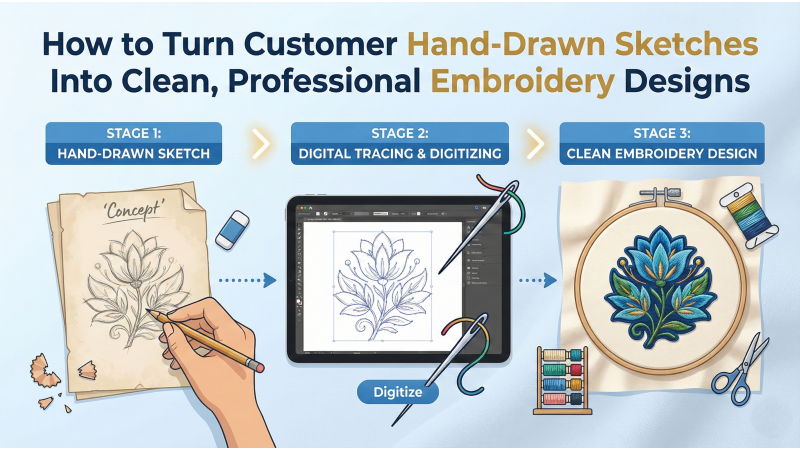
How to Transform Hand-Drawn Customer Sketches Into Clean, Professional Embroidery Designs
Hand-drawn sketches arrive in all forms—napkin doodles, rough pencil outlines, stylized drawings, or kid-made artwork. They often carry the spark of a customer’s idea, yet they rarely match the clarity, balance, and precision that embroidery machines demand. Turning those imperfect sketches into crisp, production-ready artwork is both an art and a science. With the right workflow, you can convert any rough sketch into a polished design ready for digitizing and stitching.
Many embroiderers choose to learn this skill themselves, especially after watching tutorials such as this detailed digitizing walkthrough on YouTube, while others explore structured guides like this explanation of how to digitize your own embroidery designs. No matter which learning route you take, understanding the workflow below will help you clean, refine, and prepare artwork the right way.
1. Capture a Clean, High-Quality Image of the Sketch
The journey begins with a clear picture of the sketch. Poor lighting, shadows, and angled photos distort the drawing and make tracing more difficult. Before you begin editing, ensure you have an image that is sharp, evenly lit, and captured from above.
- Use bright daylight or white LEDs.
- Place the paper on a flat, clean surface.
- Hold the camera directly above the sketch to avoid perspective distortion.
- Avoid shadows from hands or overhead objects.
- If available, request a scanned version for maximum clarity.
You can observe proper image-preparation methods in tutorials like this sketch-to-digital process breakdown, which shows how clarity affects every later step.

2. Clean Up the Sketch Digitally Before Tracing
Once you import the sketch into software like Illustrator, CorelDRAW, Photoshop, Krita, or Procreate, your task is to improve visibility and prepare it for a clean redraw. This phase includes sharpening outlines, balancing contrast, removing smudges, and straightening the artwork.
- Adjust brightness and contrast to highlight the lines.
- Use erasers or cleanup tools to remove noise and extra marks.
- Straighten the sketch using rotation or perspective correction.
- Increase line thickness slightly if the original sketch is faint.
This cleanup process is crucial because embroidery digitizing relies heavily on clear, well-defined shapes. A cluttered photo leads to inaccurate tracing and more revisions later.
3. Trace the Artwork Into Clean, Smooth, Professional Lines
Tracing is where the sketch transforms from a rough idea into structured artwork. Manual tracing using vector tools provides full control over every curve, corner, and proportion—something auto-tracing cannot achieve reliably.
Auto-trace tools often create:
- Jagged paths
- Excess nodes that cause rough embroidery stitches
- Uneven curves
- Shapes that digitize poorly
Manual tracing gives you clean geometry and consistent line flow. If you want to see real-time tracing methods, this tracing tutorial showcases smooth line-building techniques. During tracing, maintain the essence of the customer’s idea, but refine proportions and symmetry so the embroidery result looks intentional and polished.
4. Convert the Artwork Into a Vector File
Once the traced artwork is complete, convert it into a vector format. Vectors allow unlimited scaling without pixelation and provide clean, closed paths—ideal for embroidery digitizing.
Recommended vector formats:
- SVG
- AI
- EPS
- PDF (vector-based)
Vector art is also easier to organize by colors and layers, preparing it for a smoother transition into digitizing software.
5. Prepare the Vector Artwork for Digitizing
Before digitizing, refine your vector to avoid stitch-quality problems. Embroidery has physical limitations; overly tiny elements or ultra-thin strokes may not stitch correctly. Preparing artwork properly makes digitizing significantly easier.
- Remove tiny details smaller than 1–2mm.
- Increase stroke weights to support satin stitching.
- Ensure all shapes are fully closed (no open paths).
- Group shapes by color for easier sequencing.
- Unify overlapping shapes for cleaner fills.
Watching digitizing-specific demos—such as this practical digitizing breakdown—helps clarify what artwork adjustments are needed before stitch creation.
6. Digitize the Clean Artwork Into an Embroidery File
Digitizing is the heart of turning artwork into embroidery. Here you assign stitch types, densities, directions, underlay, and compensation. Every decision impacts stitch smoothness and production speed.
Digitizing workflow:
- Import your vector artwork into your software (Wilcom, Hatch, Embird, etc.).
- Apply the right underlay for the fabric type.
- Choose appropriate stitch types for each section.
- Adjust density to prevent puckering or gaps.
- Apply pull/push compensation for accurate shapes.
- Assign thread colors and final sequence.
You may find additional tutorials helpful, but a clear example is this digitizing explanation, which demonstrates how stitch settings affect final output.
7. Run a Stitch-Out Test Before Delivering to the Customer
No digitized design is complete without a test stitch-out. Even when the artwork is perfect, fabrics behave differently—stretch, thickness, pile height, and texture all affect stitch results.
Check for:
- Too much density causing stiffness or puckering
- Too little density causing gaps
- Underlay not sufficient for stability
- Pull compensation errors affecting outlines
- Thread breaks caused by tight angles or tiny elements
If you want to refine your test-run evaluation skills, this stitch-testing demonstration is extremely helpful for beginners and professionals alike.
Final Thoughts
Transforming hand-drawn sketches into polished embroidery artwork is a multi-step process that blends creativity with technical precision. The steps—clean image capture, digital cleanup, manual tracing, vector conversion, artwork optimization, digitizing, and stitch-out testing—ensure professional results that satisfy even the most particular clients.
Mastering this skill allows embroidery shops to confidently accept custom illustrations, improve turnaround times, and reduce revisions. With consistent practice and guidance from resources like professional digitizing tutorials and expert digitizing guides, you can transform any sketch into a clean embroidery design ready for production—no matter how rough the original drawing may be.


Leave a comment