





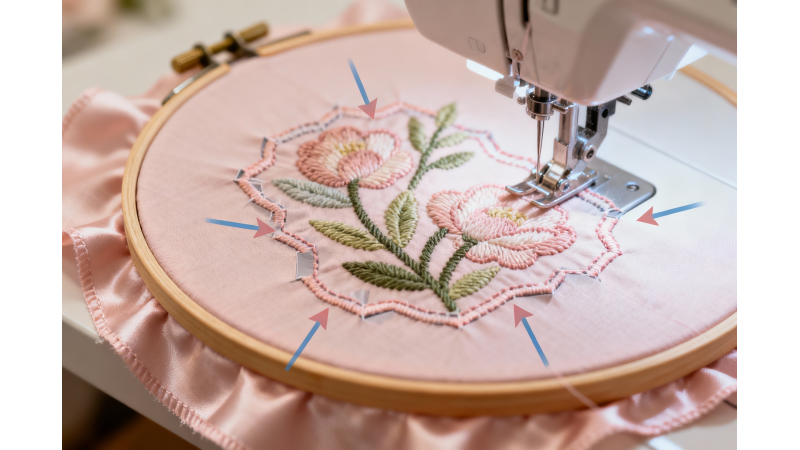
Why Your Outline Doesn’t Match the Fill — Registration Gap Fixes
One of the most common embroidery problems is when the outline doesn’t line up with the fill underneath it. This creates visible gaps, misaligned borders, and distorted shapes that ruin an otherwise well-digitized design. These issues, known as registration gaps, are usually easy to fix once you understand the causes and apply the right adjustments. For practical video guidance, see this YouTube tutorial on registration fixes.
What Is a Registration Gap?
A registration gap occurs when the fill stitches shift away from the outline, leaving a noticeable space between the fill and its border. This may appear as if the outline is floating above the fill or the fill has shrunk inward.
Main Reasons Your Outline Doesn’t Match the Fill
1. Push and Pull Distortion
Fill stitches push outward while satin outlines tend to pull inward. Without proper compensation, the fill can shrink and the outline can overshoot its intended placement.
2. Incorrect or Insufficient Stabilizer
Thin or stretchy fabrics need firm support to prevent shifting. Weak stabilizers allow the fabric to move, causing fills to misalign. Learn more about stabilizer selection in Hatch Embroidery's guide.
3. Poor Hooping Technique
Improper hoop tension—too loose or too tight—leads to movement during stitching. Even slight shifts can create registration gaps.
4. Fill Stitch Density Too High
High-density fills pull the fabric, causing shrinkage and misalignment with the outline. Adjust density for your fabric type to maintain alignment. Video tutorials like this one demonstrate practical density adjustments.
5. Embroidery Machine Speed Too Fast
Fast stitching increases vibration and fabric movement. Slowing down the machine improves outline-to-fill alignment and reduces misregistration. For speed adjustment tips, see this video.
6. Incorrect Digitizing Order
Stitching outlines before fills can cause the fill to shift beneath the outline. Always stitch fills first, then outlines. Guidance on digitizing order is available at this tutorial.
7. Fabric Type Not Suited for the Design
Loose-weave, stretchy, or delicate fabrics tend to move during stitching. Use appropriate stabilizers and basting stitches to minimize shifts.

How to Fix Registration Gaps
1. Increase Pull Compensation for Fills
Adding 0.1–0.3 mm pull compensation to fill areas ensures the fill stitches extend slightly beyond the outline, compensating for fabric shrinkage.
2. Use a Stronger Stabilizer
- Stable woven fabrics: Medium tear-away or cut-away
- Knit/stretchy fabrics: No-show mesh cut-away
- Very stretchy fabrics: Cut-away + temporary adhesive
- Delicate fabrics: Water-soluble topping + mesh
3. Rehoop Properly
Ensure even tension, keeping the fabric tight like a drum without stretching. Avoid moving the fabric after hooping to prevent misalignment.
4. Reduce Fill Density
Lowering fill density reduces fabric pulling. Ideal ranges are 0.45–0.50 mm for most fabrics. For more examples, see ZDigitizing’s guide.
5. Slow Down Machine Speed
Decrease machine speed by 15–25% when stitching detailed designs to reduce vibration and misalignment.
6. Adjust the Stitching Order
Always stitch the fill first, then the outline. Digitizers should end color blocks with outlines to maintain correct placement.
7. Add Underlay to Stabilize Fills
Use an edge-run or contour underlay beneath the fill to maintain shape and prevent shrinkage.
8. Use Basting Stitches
Basting stitches around the design hold fabric securely, especially on slippery or stretchy materials. For trimming and cleanup tips, check Sewing Machine Fun.
Digitizing Tips for Perfect Outline-to-Fill Alignment
- Add 0.2 mm extra pull compensation for small objects
- Use wider satin outlines (2.0–2.5 mm) to hide minor pull
- Test-stitch on the same fabric before production
- Overlap fills slightly under the outline (0.2–0.3 mm)
- Avoid overly tight density that causes fill contraction
When a Design Cannot Be Fixed Easily
Low-quality downloaded designs with poor pathing may require redigitizing the fill, expanding the outline, or replacing narrow satin borders. Software adjustments alone may not fully resolve misregistration.
Conclusion
Registration gaps are usually caused by fabric movement, distortion, or insufficient compensation during digitizing. By stabilizing fabric, adjusting fill densities, using pull compensation, and slowing machine speed, your outlines will align perfectly with fills, resulting in clean and professional embroidery. For additional video demonstrations, see this tutorial and this video on alignment techniques.




Leave a comment