





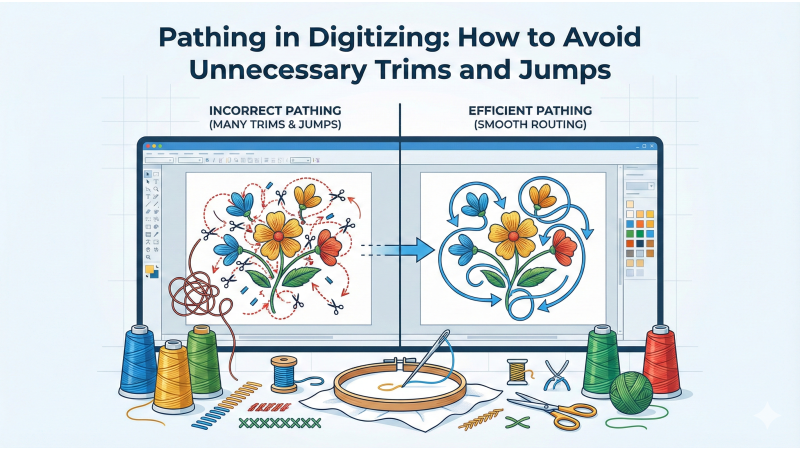
Pathing in Digitizing: How to Avoid Unnecessary Trims and Jumps
Pathing is one of the most important skills in embroidery digitizing. Good pathing determines how the design travels from one object to another, how many trims occur, and whether unnecessary jumps slow down the machine. A well-pathed design looks clean, runs smoothly, and reduces production time. Poor pathing, on the other hand, results in extra jumps, excessive trims, long run times, and messy reverse sides.
This guide explains the essential principles of digitizing pathing and how to avoid the most common problems.
What Is Pathing in Digitizing
Pathing is the order and direction in which a design is stitched. It includes how shapes connect, where the needle enters and exits, and how the digitizer minimizes movement. A detailed breakdown of pathing fundamentals can be found at Embroidery Legacy’s pathing guide.
When pathing is optimized, the machine moves logically from one area to the next without unnecessary jumps. When it is not optimized, the machine frequently stops, trims, and jumps across the embroidery.
Using Closest Join to Reduce Trims
The closest join method is one of the most effective techniques to reduce trims and jumps. Closest join means placing exit points near the next object’s entry point so the machine can travel seamlessly.
Wilcom explains this concept clearly in their closest join resource at this article. By aligning objects strategically, the machine avoids large jumps and keeps travel stitches hidden under shapes.
Setting Entry and Exit Points Correctly
Incorrect entry and exit points are one of the biggest causes of unnecessary jumps. When the next object is far from the exit point, the machine is forced to jump or trim.
A detailed explanation of entry and exit point adjustments is available at this Drawstitch article. Properly setting these points ensures natural movement from one shape to the next.

Understanding Stitch Order and Sequencing
Sequencing determines the order in which objects are stitched. Logical sequencing minimizes jumps, improves quality, and strengthens the design structure.
Helpful sequencing examples can be found at NeedleUp’s pathing explanation and additional guidance at Mr X Stitch’s pathing guide.
When sequencing properly:
- Group objects by proximity
- Avoid bouncing across the design
- Travel inside filled areas when possible
- Start with elements that stabilize the fabric
Using Software Tools to Remove Extra Jumps
Many digitizing programs include built-in tools to reduce unnecessary trims. For example, Embrilliance provides jump removal and overlap options described at this documentation page.
Auto-digitizing tools such as those explained at this Hatch training guide can sometimes produce extra jumps, so manual refinement is often needed.
Splitting Objects for Cleaner Travel Paths
Large shapes or long satin columns sometimes require splitting to avoid long jump distances. Splitting also allows more control over stitch direction and layering.
Practical examples of splitting and pathing improvements are shown in tutorials such as:
Controlling Travel Stitches
Travel stitches allow the machine to move without trimming, but they must be hidden well. Use underlay areas or dense regions to conceal movement, and avoid visible long stitches that stand out on finished work.
Lynnie Pinnie provides examples of travel stitch handling in their digitizing guidance at this Good Design article.
Adjusting Pathing in Multi-Object Designs
Complex designs often require multiple pathing strategies within the same file. Some shapes should connect; others must be trimmed for clean separation. Tutorials such as this digitizing explanation demonstrate how to decide when to connect or separate shapes.
Practice and Review Are Essential
Digitizing pathing is a skill learned through repetition. Reviewing stitch simulations, slowing down the preview, and stitching samples help identify unnecessary jumps. Many digitizers refine their pathing through manual adjustments after the initial draft.
Conclusion
Effective pathing is key to producing clean, efficient embroidery files. By optimizing entry and exit points, sequencing objects, using closest join techniques, and adjusting travel stitches, you can significantly reduce trims and improve design performance. Every improvement in pathing leads to a smoother-running machine, cleaner results, and faster production.
Related Products

Leave a comment