





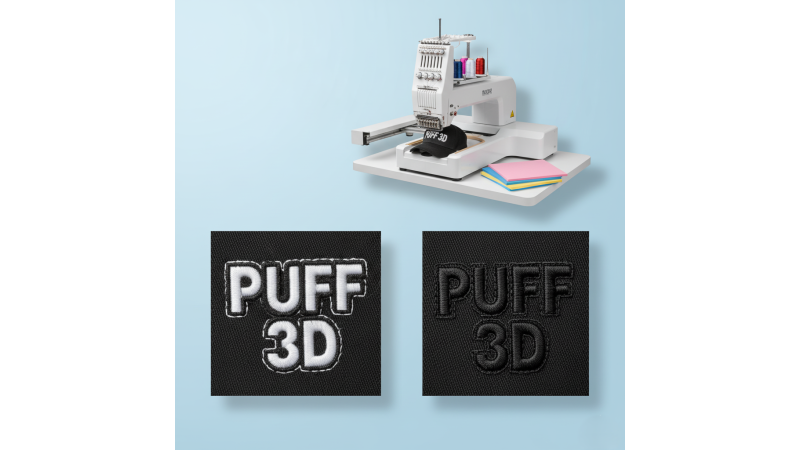
Puffy 3D Foam Embroidery Issues and How to Solve Them
Overview: Puffy (3D) foam embroidery gives bold, raised lettering and logos — but thin fabrics and dense designs commonly cause problems such as foam showing through, uneven puff, satin stitch breaks, and distortion. If you're new to puff techniques, this 3D puff embroidery guide provides a good foundation before diving into troubleshooting. This article explains why issues happen and how to fix them with practical steps.
Why problems happen (quick technical primer)
- Design density: Heavy satin fills or tightly packed stitches put pressure on foam and fabric, compressing the foam or causing stitches to sink. A detailed explanation of this can be seen in Ricoma’s guide on why stitches sometimes fail to cover foam properly.
- Thin substrate: Lightweight fabrics lack structure and easily distort.
- Improper backing: A weak stabilizer cannot support foam and fabric during dense stitching.
- Needle, tension, & presser foot: Incorrect settings create friction, thread breaks, or foam exposure.
- Design path & stitch type: Uneven sequencing or long satin paths often flatten puff or cause distortions.
Immediate fixes — start here
1. Reduce design density
Lower satin density, widen satin bands, and convert very narrow satin columns to running or light fill stitches. Many embroiderers demonstrate this in action — for example, this puff embroidery tutorial shows how density adjustments improve foam coverage.
2. Use the right foam & backing
- Use 2–3 mm foam for thin fabrics.
- Use spray adhesive or fusible material to hold foam in place.
- Use light cutaway for knits and thin tear-away for woven fabrics.
3. Adjust needle, thread, and tension
- Use a sharp 75/11 or 80/12 needle.
- Lower top tension slightly to avoid cutting into the foam.
- Use high-quality embroidery thread to reduce breakage. A practical walkthrough can be seen in this second puff embroidery video tutorial.
Design & digitizing changes that help
1. Convert very narrow satin
Satin columns under 3 mm tend to slice the foam or fail to cover entirely. Switching to run or triple-outline stitches improves clarity.
2. Add a “holding stitch” or overlay
A light top stitch after trimming the foam stabilizes the design edges and prevents poking or fraying. MaggieFrame explains this technique further in their article on mastering puffy foam for cleaner results.
3. Sequence wisely
Breaking long satin paths into smaller seg

Leave a comment