





Pull Compensation Deep Dive: Fixing Gaps in Satin and Fill Stitches
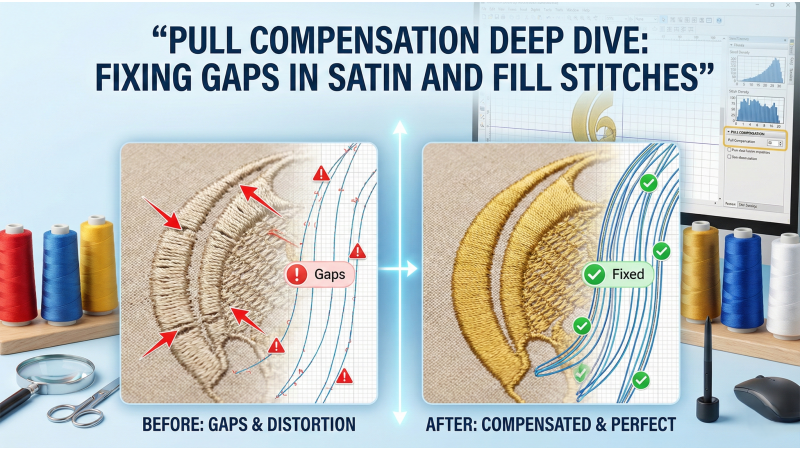
Pull compensation is one of the most important digitizing techniques used to correct distortion in embroidery. When fabric stretches, stitches tighten, or machine tension increases, satin and fill stitches often shrink inward. This causes visible gaps, outlines that miss, and shapes that fail to meet correctly. In this deep dive we'll explain why pull distortion happens, show practical fixes for satin and fill stitches, and point you to helpful video walk-throughs so you can see the techniques in action.
Why Pull Distortion Happens
Embroidery stitches pull fabric toward the center of the design. The longer the stitch, the greater the pull effect. Satin stitches and wide fill areas are particularly affected because their longer stitch length creates more tension. If compensation is not applied during digitizing, the final stitch-out will look narrower or smaller than the original artwork.
For a short visual demonstration of how long satin columns behave and how endpoints affect the final shape, watch this clear tutorial that compares entry/exit adjustments and column extensions. It gives a quick, practical example of how small changes at the endpoints change the stitched outcome: Satin column endpoint & pull demo.
When Pull Compensation Is Needed
Designers typically apply pull compensation whenever gaps appear, outlines miss, or edges shrink. Common situations include wide satin columns, stretchy fabrics, high-tension machines, and dense fill areas. Without proper compensation, satin stitches pull inward and leave open spaces, while fills fail to meet borders or appliqués.
Here's a practical machine-side example showing stitch behavior on different fabrics and how to choose an initial compensation value to test with — very useful to reference when planning test swatches: Fabric & tension test for compensation.
Applying Pull Compensation in Digitizing Software
Most digitizing programs allow manual or automatic pull compensation. Increasing pull compensation widens the satin column or expands fill regions to counter expected shrinkage. The amount depends on the fabric, stabilizer, and stitch type. Thin fabrics require more compensation, while firm fabrics require less.
- Start conservative: add a small amount of compensation and test-stitch.
- Document results: record which compensation values worked on which fabric + stabilizer combo.
- Tweak density & underlay: compensation complements other settings — don’t rely on it alone.
If you prefer a step-by-step screen capture showing how to set compensation in popular digitizing software and how to preview the expected pull visually, this tutorial walks through the software menus and shows before/after stitch previews: Software pull compensation walkthrough.

Correcting Gaps in Satin Stitches
Satin stitches tend to shrink the most because of their long stitch length. To fix this, increase pull compensation on both sides or extend the endpoints of each satin column. Digitizers often adjust entry and exit points to ensure smooth transitions and reduce distortion. Correct compensation allows the edges to meet cleanly after stitching.
Practical tips for satin columns:
- Use balanced compensation on both sides of a column so the shape remains symmetrical.
- Adjust the column endpoints — extending slightly beyond the visible boundary helps the fabric settle without leaving gaps.
- Combine underlay layers (e.g., edge-run underlay) to stabilize the fabric before the satin is stitched.
For live stitch-out examples comparing different endpoint and compensation combinations on the same design, watch this video that stitches the same satin column multiple times with different settings so you can compare results: Satin endpoint & compensation stitch-out comparison.
Fixing Gaps in Fill Stitches
Fill stitches also suffer from pull distortion, though typically less than satins. Compensation for fills usually involves expanding the fill area slightly beyond the original boundaries. If outlines fail to match fills, the fill region may need added compensation before the outline is digitized.
Key techniques for fills:
- Overlap fills and outlines: make the fill slightly overlap the outline so that small shrinkage doesn't reveal fabric.
- Use staggered pathing: pathing that reduces long parallel runs helps distribute tension.
- Consider micro-density changes: small adjustments to density across large fills can reduce overall pull.
To see a side-by-side of fill fixes (expansion, pathing changes, overlap strategies) and the resulting stitch-outs, check out this practical stitch-out tutorial that focuses on fills and outlines: Fill expansion & outline matching demo.
Fabric Type and Pull Compensation
Fabric choice dramatically impacts pull distortion. Stretchy fabrics such as knits and performance fabrics require extra pull compensation. Stable fabrics such as canvas or denim require less. Always test stitch-outs on the same fabric type before final production.
Recommendations by fabric:
- Knits / stretch fabrics: higher compensation + cut-away stabilizer, tight hooping.
- Lightweight woven: moderate compensation and a stable tear-away or light cut-away.
- Heavy fabrics (denim, canvas): low compensation, consider coarser densities for better coverage.
Stabilizer and Hooping Effects
A strong stabilizer reduces fabric movement and minimizes distortion. Tear-away stabilizer may allow shifting, while cut-away stabilizer offers the most support. Proper hooping also ensures the fabric remains taut, reducing the need for extreme pull compensation.
Hooping tips:
- Use a hoop large enough to distribute tension evenly.
- Hoop fabric and stabilizer together where possible, or use adhesive/tape to secure delicate fabrics.
- Check hoop alignment regularly — mis-hooping often looks like bad compensation when the real issue is movement.
Machine Tension and Speed Considerations
High tension increases pull distortion by tightening stitches. Lowering top tension and reducing stitch speed can help reduce shrinkage. If gaps persist, adjust the compensation in the digitizing file accordingly.
Always combine machine-side adjustments (tension/speed) with digitizing corrections — both layers affect the final result.
Common Pull Compensation Mistakes
Digitizers sometimes apply too much pull compensation, resulting in stitches that extend beyond intended borders. Another mistake is applying the same compensation value to all fabrics, even though each material behaves differently. Overuse of density instead of proper compensation can also cause puckering.
To avoid these mistakes:
- Run small test swatches and document results per material.
- Tweak compensation incrementally rather than applying large jumps.
- Prefer pathing and entry/exit fixes over overcompensating with density changes alone.
Advanced Methods for Pull Correction
Techniques such as closest-point connections, proper pathing, and optimized entry-exit points help reduce jump stitches and unnecessary tension, resulting in cleaner edges. Digitizers may also adjust angle changes, add underlay, or fine-tune stitch direction for improved control over pull distortion.
Advanced checklist:
- Use underlay strategically: edge runs for satin, zigzag underlay for fills.
- Optimize pathing so the machine makes logical, tension-minimizing moves.
- Use micro-adjustments to density only when pull compensation and pathing are already optimized.
Conclusion
Pull compensation is essential for producing clean, distortion-free embroidery. Whether working with satin stitches, fill stitches, or complex shapes, understanding fabric behavior and digitizing adjustments ensures accurate stitching. By applying the correct compensation values and using proper stabilizing techniques, embroiderers can eliminate gaps and achieve professional-quality results on any project.
If you're testing these techniques for the first time, make a small swatch notebook: note the fabric, stabilizer, machine tension, compensation value used, and a short verdict. Over time you'll build a quick reference that drastically shortens troubleshooting and helps you deliver consistent stitch-outs.
Related Products

Leave a comment