





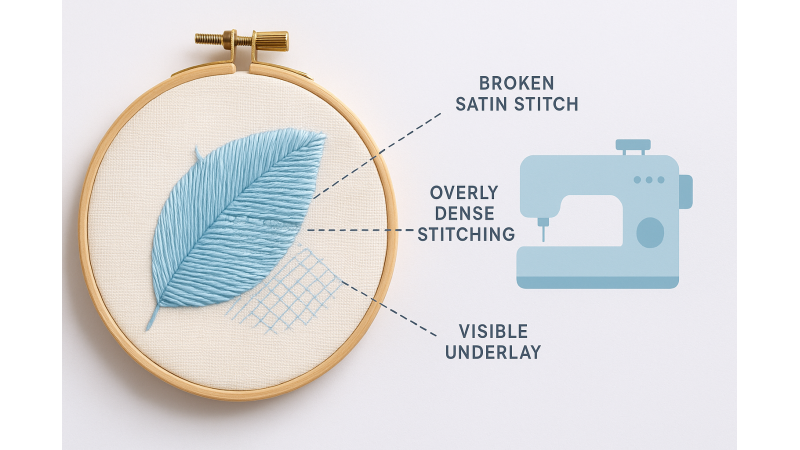
Satin Stitches Breaking? How to Fix Density, Pull, and Underlay Problems
Satin stitches are one of the most beautiful yet delicate elements in embroidery. They bring shine, smoothness, and bold definition—but they can also be the first to break when something in the digitizing or machine setup goes wrong. Many embroiderers struggle with fraying, gaps, thinning, or thread snaps in satin areas. These issues often come from incorrect density, poor pull compensation, weak underlay, or fabric instability. If you want a deeper visual explanation, you can explore detailed breakdowns like the satin stitch troubleshooting demonstrations in this satin-stitch technique video, which highlight how small digitizing choices create big stitch consequences.
In this guide, we’ll go far beyond the basics and walk through the top causes of satin stitch breakage—plus practical fixes supported by expert digitizing resources. Whether you're working with small monograms or wide decorative borders, you’ll find everything you need to perfect your satin stitch quality.
1. Excessive Satin Stitch Density
High density is one of the most frequent reasons satin stitches break. When too many stitches stack tightly, the thread rubs against the needle eye and fabric, causing friction and shredding. Dense areas also increase the number of times the needle penetrates nearly the same spot, which leads to needle deflection and breakage.
Fix: Reduce density slightly so stitches can lay flat without overlapping too aggressively. If you digitize your own designs, reviewing density examples from professional digitizers—like the underlay and density discussions here at Cre8iveSkill’s underlay guide—will help you better understand the balance between coverage and stitch tension.
2. Incorrect Pull Compensation
Pull compensation determines how much wider the satin stitch becomes to counter the natural inward pull of thread tension. Too little pull compensation causes visible gaps, while too much creates bulging satin columns that snap easily.
Fix: Increase pull compensation slightly for narrow columns and decrease it for thick, wide satin bands. The fundamentals of satin shaping are explained in resources such as this satin stitch digitizing guide from Megri Digitizing, which shows how width changes affect thread stress.
3. Poor Underlay Selection
Underlay is the hidden support system beneath satin stitches. Without proper underlay, satin stitches can sink into the fabric, distort, or break due to friction. Choosing the wrong underlay type is a common digitizing misstep.
Fix: Use edge-walk underlay for thin satin columns and zigzag underlay for wider areas. Underlay direction should follow the final satin stitch path for ideal stability. For more practical comparison of underlay styles, the article at Cre8iveSkill offers clear examples of how each underlay type supports satin work.
4. Wrong Needle Size or Type
A dull needle, incorrect size, or wrong needle point can dramatically increase thread shredding—especially on dense satin areas or thick fabrics. Needle friction is one of the most overlooked causes of satin thread breaks.
Fix: Change the needle regularly and use the right size. For most satin stitches, a 75/11 or 80/12 embroidery needle is ideal. When working with delicate satin columns, a video demonstration like this satin stitch sewing guide helps visualize how needle type impacts stitch flow.
5. High Machine Speed
Satin stitches need smooth, controlled movement. Too much speed increases needle heat, friction, and vibration—leading to more breaks. Wide satin columns are especially prone to snapping at high speeds.
Fix: Slow down for wide, shiny satin areas or dense decorative borders. A moderate speed allows the needle to penetrate smoothly and reduces stress on the thread.
6. Poor Thread Quality or Old Thread
Thread that has absorbed moisture, dried out, or weakened over time breaks easily during the repetitive motions of satin stitching. Low-quality threads also produce inconsistent sheen and tension, which worsens breakage.
Fix: Use high-quality polyester embroidery thread known for elasticity and strength. If you're troubleshooting recurring gaps, the guide at Latest Embroidery’s satin gap tutorial helps identify when thread quality—not digitizing—is the real culprit.
7. Incorrect Tension Settings
Tight upper tension pulls the top thread too aggressively, which causes breakage or thin, uneven satin texture. Loose tension, on the other hand, can cause looping and snagging.
Fix: Loosen the upper tension slightly when satin threads appear dry or stretched. Test tension changes on scrap fabric for each new project.
8. Unstable Fabric Support
Satin stitches need a stable foundation. If the fabric shifts or sinks during stitching, the satin column becomes uneven, creating weak points where the thread snaps.
Fix: Use firm cut-away stabilizer for knit or stretchy fabrics. Floating fabric instead of over-stretching it also helps preserve satin structure. Additional stabilizer tutorials and embroidery support advice can be found on educational sites like EmbDesignTube, which specialize in embroidery tips and digitizing knowledge.
9. Poor Digitizing Techniques
Digitizing mistakes such as extreme satin width, unnecessary layering, abrupt stitch direction changes, or lack of pathing logic contribute heavily to thread breaks. Even beautifully designed artwork can result in poor embroidery if the satin structure isn’t planned well.
Fix: Keep satin columns under 7–8 mm when possible. For wider areas, switch to a split-satin approach. Reviewing professional satin guidelines like the ones shown in Megri Digitizing’s satin guide helps improve your digitizing workflow.
10. Improper Bobbin Setup
A poorly wound or inconsistent bobbin causes fluctuating tension, which directly affects satin stitch smoothness. Satin stitches depend on even bobbin tension to maintain balanced thread pull.
Fix: Use pre-wound bobbins or wind your bobbin slowly and evenly. Check that the bobbin case moves freely without jerking.
Conclusion
Satin stitches break primarily due to density issues, incorrect pull compensation, weak or missing underlay, and unstable fabric support. But once you understand how these factors interact, fixing them becomes much easier. By applying the right density, proper underlay, quality thread, and stable tension—combined with solid design principles from professional resources like Latest Embroidery and technique videos such as this satin stitch demo—you’ll achieve smooth, durable satin stitching that looks polished and professional every time.
Related Products

-350x350w.jpg "Latest Beautiful Blouse Embroidery Pattern Designs | November 2020 Bulk Download")
-350x350w.jpg "Latest Beautiful Blouse Embroidery Pattern Designs | November 2020 Bulk Download")

Leave a comment