





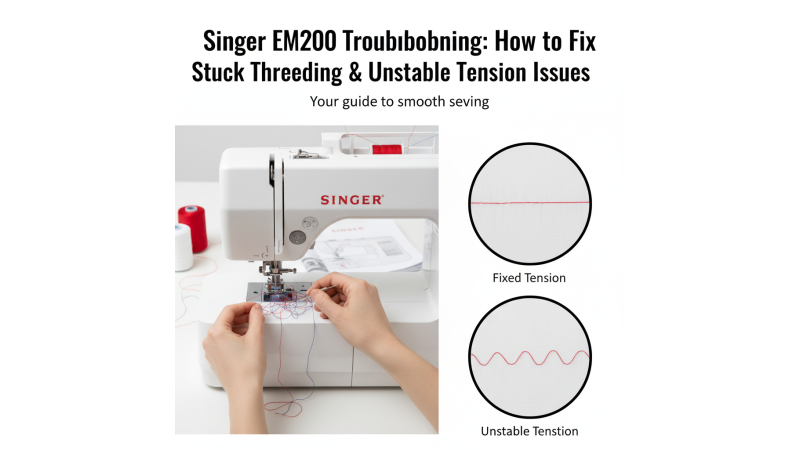
Fix Singer EM200 Threading & Tension Problems Easily
Is your Singer EM200 embroidery machine giving you trouble? It’s an excellent model for creative embroidery projects, but sometimes even the best machines can misbehave.
The two most common frustrations users face are:
- The automatic threader getting stuck or freezing mid-cycle.
- Tension issues appearing when switching from cotton to polyester thread.
These problems are more common than you think — and the good news is, they’re often easy to solve. Let’s fix them step by step.
Problem 1: The Automatic Threading Cycle is Stuck
You press the auto-thread button and nothing happens — or worse, it gets halfway and freezes. This issue is usually caused by a firmware lag, sensor block, or a tiny obstruction in the threading mechanism.
For visual help, you can also watch these helpful videos:
Singer EM200 Threader Fix Tutorial
Singer Threading Guide Video
EM200 Troubleshooting Help
If your threader seems completely jammed, this troubleshooting discussion may help: Singer EM200 Stuck Threader Support
How to Fix a Stuck Threader
Power Reset Trick
Turn the machine off and wait 30 seconds before restarting. This clears temporary firmware memory and repositions the threader correctly.
Check for Firmware Updates
Visit the official Singer site or explore our full Singer Machines Embroidery Designs section for model-specific tips and design usage ideas. Keeping your EM200 updated can solve lagging issues permanently.
Clean the Threader Path
With the machine turned off, inspect for lint, tiny thread bits, or dust blocking the movement path. Use a soft brush or tweezers to clean gently.
Reset to the Home Position
Turn the power back on, raise the presser foot, and bring the needle to its highest point using the Needle Up/Down button. Then re-engage the automatic threader cycle.
Problem 2: Unstable Tension When Switching Threads
Your cotton embroidery looks flawless, but after switching to polyester, you start seeing loops, “bird’s nests,” or uneven stitching. This isn’t a hardware defect — it’s about how different thread materials behave.
Why Cotton & Polyester Behave Differently
- Cotton Thread: Soft, slightly fuzzy, grippy, and creates more friction inside the tension discs.
- Polyester Thread: Smooth, strong, slippery, reducing friction inside the machine.
This means a tension setting perfect for cotton is usually too loose for polyester.
How to Get Stable Tension Every Time
- Increase the top tension slightly when switching from cotton to polyester.
- Use a fresh 75/11 embroidery needle to avoid skipped stitches.
- Rethread the machine with the presser foot raised so the thread sits correctly in the tension discs.
- Do a test stitch on scrap fabric before starting your design.
Pro Tip: Download small, high-quality test designs from the Singer EM200 Embroidery Design Collection — ideal for fine-tuning tension adjustments.
Test Your Fixes with Real Designs
Once your EM200 is ready, test it with real designs made specifically for Singer models. Explore these curated pages:
- Singer Machines Embroidery Designs – all compatible Singer design collections in one place.
- Singer EM200 Design Collection – verified patterns optimized for EM200.
- Singer SE9185 & SE9180 Designs
- Singer EM9305 Embroidery Designs
Final Thoughts
The Singer EM200 is a powerful embroidery partner — but like any precision machine, it needs a little attention to keep it running perfectly. By updating firmware, clearing threading obstructions, and adjusting tension when switching thread types, you’ll enjoy smooth stitching and professional results every time.
Start stitching again with confidence — and browse our ready-to-use Singer EM200 Embroidery Designs to bring your next project to life.
Related Products



Leave a comment