





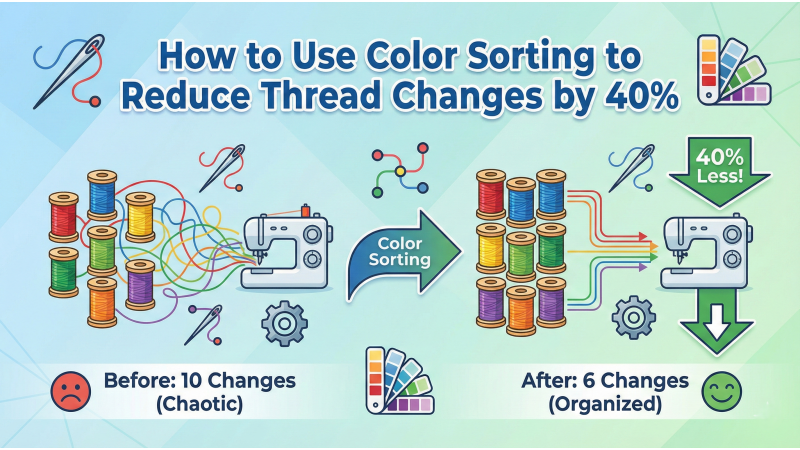
How to Use Color Sorting to Reduce Thread Changes by 40%
Color Sorting is one of the most powerful yet often overlooked tools in modern embroidery software. Whether you use Wilcom, Hatch, Pulse, Embrilliance, or other digitizing platforms, this feature can dramatically reduce production time by reorganizing the sequence of same-color objects for better stitching flow. Understanding proper sequencing is essential, and resources like Hatch’s official sequencing guide and Wilcom’s documentation on Sequence by Color provide helpful foundations for professional workflow control.
Color sorting is especially important for designs that contain scattered elements, repeated shapes, or unnecessarily fragmented color layers. Many beginners stitch designs exactly as digitized without optimizing the running order. This results in excessive thread changes that slow down both single-head and multi-head machines. Expert digitizers often emphasize smart sequencing rather than over-sorting, as explained in this detailed article on why not every design should be color-sorted.
To better understand color sequencing and machine behavior visually, you can explore instructional videos such as this color-sorting stitch flow demonstration, or learn how sorting affects production speed in practical real-world scenarios with videos like this advanced sequencing walkthrough and this multi-layer embroidery efficiency guide.
What Is Color Sorting in Embroidery?
Color Sorting reorganizes your design so that all objects sharing the same thread color stitch together in a continuous sequence. For example, instead of stitching a small red flower, switching to blue, and coming back to red later, the software groups all red shapes in one pass. This prevents unnecessary thread changes and significantly speeds up production.
Many auto-digitized or beginner designs contain scattered segments in random order, causing the embroidery machine to change colors far more often than needed. Color Sorting analyzes object layers, thread assignments, and sequence groups to produce an optimized flow that reduces downtime and improves production rhythm.
Key Benefits of Color Sorting
1. Reduce Thread Changes by 30–40%
Thread changes are among the biggest time-killers in embroidery production. Each change forces the machine to trim, reposition, and load a new thread. By grouping same-color objects, you eliminate unnecessary stops and significantly shorten total run time on both commercial and home machines.
2. Faster Bulk Production
For multi-piece orders—caps, shirts, uniforms, patches—cutting even a few seconds from each color change multiplies into hours saved. Multi-head machines especially benefit from consistent sequencing, as unnecessary thread changes slow down every head at once.
3. Lower Machine Strain and Fewer Thread Breaks
Thread breaks often occur right after color changes due to tension variations. Fewer color switches mean fewer opportunities for breakage, smoother stitching, and reduced wear on tensioners, guides, and needle bars.
4. Improved Efficiency for Multi-Head Machines
Multi-head machines stay synchronized when the design has clean, organized sequencing. Color sorting prevents lagging heads, reduces desynchronization, and ensures uniform stitching quality across all heads.
When Should You Use Color Sorting?
1. Repeated Elements With the Same Color
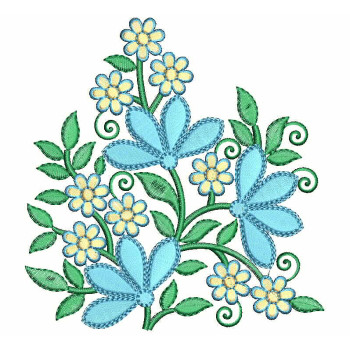
Logos, monograms, icons, badges, and floral elements often use repeated colors. Sorting groups them into efficient stitching blocks.

2. Designs With Many Colors
The more colors in a design, the more unnecessary switches you can eliminate with sorting.
3. Bulk Orders and Production Runs
For high-volume embroidery, optimized color sequencing makes a dramatic difference in stitch time and machine wear.
4. Designs Without Strict Manual Sequence Requirements
If the design doesn’t rely on specific push/pull logic or pathing sequences, color sorting is safe and effective.
How to Use Color Sorting in Wilcom
Wilcom includes a powerful automatic sorting engine. To use it:
- Select your entire design.
- Go to Arrange → Color Sort.
- Wilcom will analyze and reorganize matching color groups.
- Review the sequence to ensure no overlaps or border issues occur.
Wilcom's official sequencing documentation linked earlier provides deeper insights into how color grouping interacts with manual pathing and layered designs.
How to Use Color Sorting in Hatch
Hatch makes color sorting even easier with beginner-friendly controls:
- Open your design.
- Go to Customize Design.
- Select the Color Sort tool.
- Review the preview and confirm the optimized sequence.
The linked Hatch sequencing guide explains additional tips on grouping and pathing to avoid sorting issues.
Common Mistakes to Avoid
1. Sorting Layered Satin Borders
Satin borders often rely on sequential layering. Sorting may force them out of order and cause visual defects.
2. Sorting Designs With Advanced Pathing Logic
Complex artwork or shapes requiring specific direction may break if automatically reorganized.
3. Mixing Underlay and Top Stitches
Underlay must always stitch first. Color sorting may inadvertently move it if not locked correctly.
4. Skipping Manual Review After Sorting
Automatic tools are powerful but not perfect. Always check the final sequence before exporting the design.
Pro Digitizer Tips for Safe Color Sorting
- Group objects that must stay together before sorting.
- Protect underlay objects by locking them or assigning them separately.
- Only perform sorting after manual pathing is complete.
- Run a full stitch simulation after sorting to verify flow and consistency.
Conclusion
Color sorting is one of the simplest and most effective ways to reduce thread changes by up to 40%, streamline stitch flow, and improve production efficiency. With proper sequencing techniques, optimized object grouping, and careful review, this feature can transform your workflow—especially for large production batches or multi-head machines. Combine smart sequencing guidance, color-order controls, and visual stitch demonstrations from the linked resources above to master professional color optimization in your embroidery workflow.
Leave a comment