





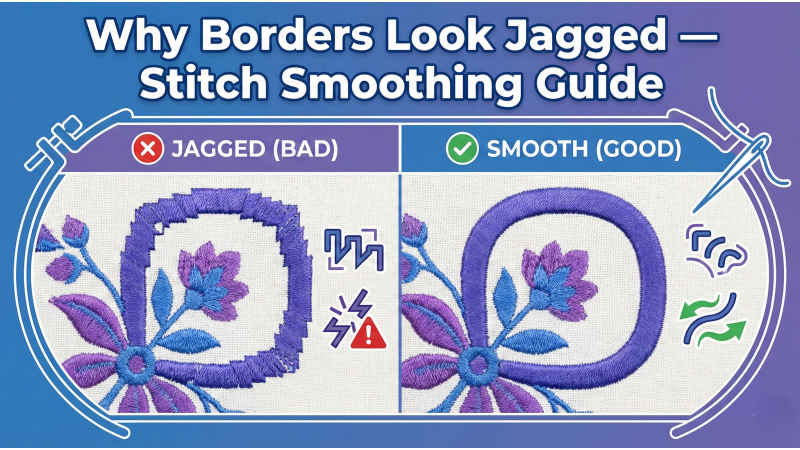
Why Borders Look Jagged — Complete Stitch Smoothing Guide
Jagged, rough, or uneven borders are among the most frustrating embroidery problems for digitizers, hobbyists, and machine operators. A clean outline is one of the strongest signs of high-quality digitizing, yet even experienced embroiderers struggle with borders that appear bumpy, broken, or inconsistent. While many users initially believe the issue comes from the machine, the truth is that jagged borders are usually caused by digital structure, fabric behavior, or stitch execution.
Issues such as narrow satin columns, sharp angle changes, incorrect pull compensation, fabric shifting, and poor underlay affect stitch smoothness. These same problems are discussed often in community spaces—like a helpful post on StackOverflow showing how jagged shapes need proper refinement before stitching, and a Reddit discussion on jagged edges in Embrilliance reinforcing how digitizing choices impact final stitch quality.
1. Satin Border Is Too Narrow
One of the most common reasons borders look jagged is that the satin stitch width is too small. Satin stitches produce a beautiful shine and smooth edges—but only when they have enough width to form a stable, clean line. Anything below 1.2 mm tends to collapse inward, creating bumpy or uneven edges. For a polished border, 1.5–2 mm is ideal.
When sewing projects involve curves or delicate shapes, your stitch path must reflect the fabric’s behavior. Even in hand sewing, smoothness depends on controlled stitch direction—something beautifully explained in this Craftsy tutorial on sewing curved seams.
Fix: Increase satin width to 1.5–2 mm for consistent shine and smooth borders.
2. Wrong Stitch Angle on Curves
Curved borders require careful angle transitions. If stitch angles shift abruptly, the satin line forms tiny “corners,” resulting in jagged curves. Smooth curves come from multiple angle points that gradually rotate along the path—very similar to how vector smoothing or curve interpolation works in graphic editing.
Many embroiderers visually demonstrate this issue, like in this video explaining digitizing smooth curves: Digitizing Smooth Curves.
Fix: Add multiple angle points with gentle transitions to create fluid curves.
3. Not Enough Pull Compensation
Pull compensation prevents the stitches from shrinking inward on stretchy or loosely woven fabrics. Without enough compensation, your borders appear thin, jagged, or misaligned with the artwork. This problem is more obvious around tight curves and small details.
Many machine embroidery tutorials highlight this issue, including videos such as: Understanding Pull Compensation in Embroidery.
Fix: Add 0.2–0.4 mm pull compensation depending on fabric stretch.

4. Fabric Movement During Stitching
Even perfectly digitized borders will look jagged if the fabric shifts during embroidery. Loose hooping, weak stabilizer, stretchy material, or slippery fabrics create inconsistent stitch placement. Fabrics like jersey, sportswear, fleece, and soft knits require extra stability.
A great demonstration of fabric behavior under stitches can be seen in this video on stabilizing stretchy materials: Stabilizing Stretch Fabrics.
Fix: Hoop fabric drum-tight, use correct stabilizer, and avoid stretching during hooping.
5. Wrong Underlay for Satin Borders
Underlay acts as the foundation that holds satin stitches in place. When underlay is too light, borders wobble; when too heavy, they become bulky. The most reliable structure for satin borders is edge-walk underlay because it anchors the shape at the exact edges where stability is needed.
If you’ve explored or purchased traditional designs such as Macedonian caftan embroidery or modern patterns like blouse embroidery styles, you’ll notice that smooth borders rely heavily on correct underlay—especially on ornate edges.
Fix: Use edge-walk underlay for precise edge control and clean border detail.
Additional Factors That Cause Jagged Borders
Thread Tension Issues
Too much tension pulls stitches inward; too little causes wavy outlines. Balanced tension produces smooth, stable borders. Some tutorials, like this explanation on edge-quality problems, are extremely helpful: How Thread Tension Affects Embroidery Borders.
Wrong Needle Type or Size
A dull or oversized needle causes drag, distortion, or enlarged holes—leading to jagged edges. Most borders look best with 75/11 or 80/12 needles unless working with delicate cloth.
Machine Speed Too High
High-speed stitching reduces accuracy. Slowing the machine improves stitch placement, especially on curves and narrow borders.
Fabric Texture Interfering with Stitch Flow
Rough surfaces like fleece, terry, and textured garments cause satin stitches to sink, making borders appear broken. Water-soluble topping helps stitches sit above the surface.
Digitizing Perfectly Smooth Borders
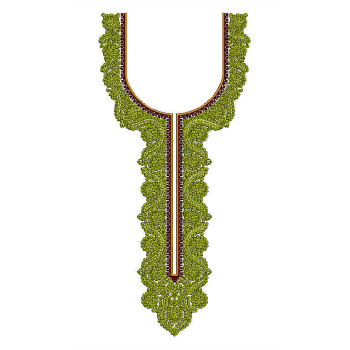
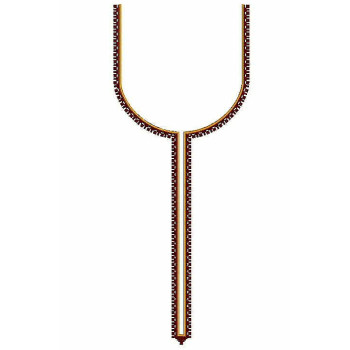
To achieve the highest quality borders, digitizers must balance satin width, angle transitions, compensation, underlay, and fabric properties. This principle applies to all types of garment embroidery—whether you are digitizing detailed pieces like full-set blouse embroidery, men’s neck designs, shoe embroidery, or heavy all-over patterns like those found in garment all-over designs.
Even hand embroidery tutorials such as the one on StitchFloral about correcting beginner mistakes highlight how border smoothness depends on consistent movement and control—a concept beautifully explained here: Top Beginner Border Mistakes.
Practical Troubleshooting Checklist
- Is satin width at least 1.5 mm?
- Are stitch angles gradual and smooth?
- Did you include enough pull compensation?
- Is fabric hooped tightly and stabilized properly?
- Did you use edge-walk underlay?
- Is thread tension balanced?
- Is machine speed moderate?
- Is the needle sharp and the correct size?
Final Tip
Smooth borders come from a careful balance of digitizing precision and machine setup. If you ever encounter jagged edges, review your digitizing path, check fabric stability, and adjust stitch settings accordingly. With the right combination of satin width, angle control, pull compensation, and underlay, your borders will stitch out clean, professional, and beautifully smooth every time.
Leave a comment