





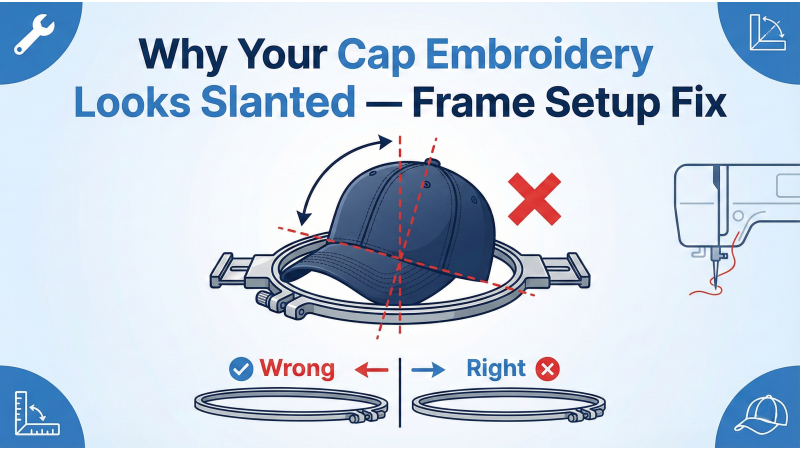
Why Your Cap Embroidery Looks Slanted — Frame Setup Fix
Cap embroidery requires far more precision than flat-garment embroidery because caps are curved, rigid, and structured in ways that naturally resist flattening. Whether you're working on side caps, back caps, or full-front logos, a common problem many embroiderers face is slanted or tilted designs. Most people blame digitizing or machine calibration, but in reality, the #1 cause is incorrect cap frame setup.
If you’ve ever tried advanced placements like side-of-cap embroidery, you already know how sensitive alignment can be. Tutorials such as this YouTube breakdown show that even strong stitch structures cannot correct a misaligned frame. Meanwhile, advanced cap framing workflows—like those demonstrated in this cap hooping tutorial—highlight how precise the setup must be.
Why Cap Embroidery Behaves Differently
Caps have multiple problem-zones: curves, seams, center ridges, thick bills, and stiff buckram. The crown area especially can push the needle sideways, making the design appear crooked even when the machine is perfectly calibrated. Professional guides such as the detailed breakdown on side-of-cap embroidery explain how minor tension changes can rotate the entire design during stitching.
Cap frames also behave differently depending on the model. For example, premium cap frames like the ones explained in this cap-frame mastery guide show how frame pressure and driver alignment must be adjusted for curved caps, flat-bill caps, and foam 3D puff caps.
1. Cap Was Not Centered on the Driver
This is the most common and most critical alignment mistake. When the cap’s center mark does not match the driver’s center line—even by 2–3 mm—the curved crown amplifies this misalignment, resulting in a visible slant.
Fix:
- Locate the factory-printed alignment mark inside the cap.
- Match it exactly with the centerline on your cap driver.
- Tighten straps evenly—uneven tension guarantees tilt.
- Check top view to ensure the bill is perfectly centered.
Even small rotational errors become worse on thicker or stiffer caps. This is especially true for back-cap placements—an area thoroughly explained in this expert back-cap embroidery guide.
2. Frame Was Tilted While Locking
Even if the cap is centered, a tilted frame causes the entire design to lean left or right. Cap frames require firm pressure to lock in place, and many embroiderers unknowingly engage the latch at a slight angle.
Fix:
- Verify the frame sits perfectly horizontal before locking.
- Make sure both latches click simultaneously.
- Check the top-down view to eliminate rotational error.
3. Not Enough Tension on the Brim
Loose caps move during stitching. The brim area especially pulls the crown up or down when tension is uneven. If the cap shifts while stitching fill areas, the resulting design will appear diagonally stretched.
Fix:
- Pull the cap downward firmly before closing the frame.
- Use both hands to distribute tension across the driver.
- Press the mounted cap onto the needle plate—if it moves, it’s too loose.
- Add stabilizer if the crown feels soft.
4. Wrong Stabilizer for Your Cap Type
Structured caps require different reinforcement than unstructured ones. Without the correct stabilizer, the fabric drifts and pulls, creating tilt even when your hooping is correct.
Correct Stabilizer Setup:
- Structured caps: 2 layers of heavy tear-away
- Unstructured caps: 1 layer cut-away + 1 layer tear-away
Using the appropriate stabilizer also helps maintain shape when embroidering appliqué designs, like the ones available here: butterfly appliqué, cartoon appliqué, vehicle appliqué, Christmas appliqué, religious appliqué, animal appliqué, cat appliqué, text appliqué, t-shirt appliqué.

5. Cap Driver Not Attached Correctly
If the driver does not sit perfectly straight inside the machine—if one pin is higher, looser, or not locked correctly—the entire stitching axis becomes rotated. This results in consistent slant across every hat.
Fix:
- Ensure both side pins snap in firmly.
- Rotate the driver manually to check for wobble.
- Reinstall if any uneven movement is felt.
- Tighten screws to prevent micro-movement during stitching.
6. Wrong Hoop Angle in the Machine
Your machine relies on hoop angle calibration to know the hoop’s orientation. If this setting is incorrect—even by a small degree—the machine will stitch as if your frame is rotated.
Fix:
- Perform a hoop angle reset.
- Run a test stitch with a horizontal line.
- If the line appears tilted, realign the X–Y axis.
Additional Factors That Amplify Slanted Embroidery
- Thick bills create upward frame lift.
- Strong center seams push stitches sideways.
- Overly dense fills cause fabric drag.
- Improper stitch angles fight the cap curvature.
- Dull needles deflect more on curved surfaces.
Final Checklist for Perfectly Straight Cap Embroidery
- Cap center aligned with driver center.
- Frame locked evenly and horizontally.
- Cap pulled tight with even tension.
- Correct stabilizer for cap type.
- Driver secured with zero wobble.
- Machine hoop angle calibrated.
When all these steps are followed, slanted designs virtually disappear. Many embroiderers spend hours adjusting their design file or machine settings, when the true solution is almost always the cap frame setup.
Conclusion
Master the frame, driver, and alignment setup, and your cap embroidery will stitch straight, clean, and professional every single time. Whether you’re embroidering the side, front, or back of caps, these steps ensure precision—and allow you to explore more advanced placements with confidence.
Leave a comment