





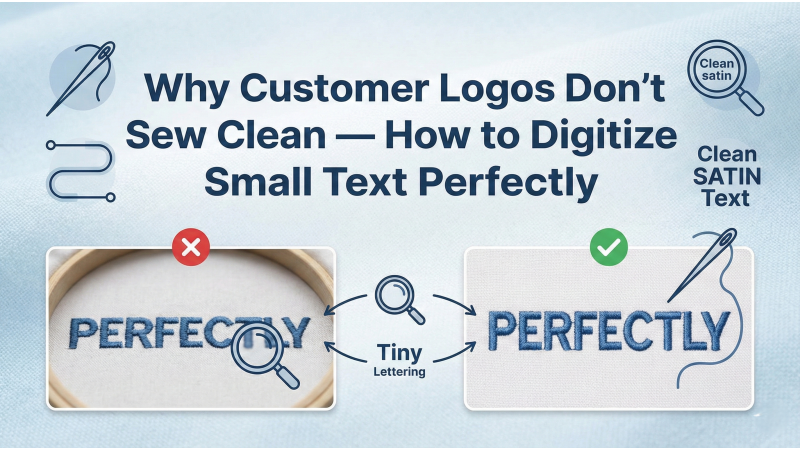
Why Customer Logos Don’t Sew Clean — How to Digitize Small Text Perfectly
Small text in customer logos is one of the most common challenges in embroidery digitizing. When letters are too tiny or incorrectly digitized, they become distorted, filled-in, unreadable, or inconsistent across different fabrics. Many beginners blame the machine, but in most cases, the root cause is the digitizing method.
This guide explains why small lettering fails and how to digitize micro text with clean, sharp, professional results on any embroidery machine.
Why Customer Logos Sew Poorly
Most customer-provided logos are designed for print, not for embroidery. Text that is readable on a screen may be too small to stitch cleanly. When these designs are digitized without adjustment, the machine struggles with density, pull direction, excessive needle penetrations, and tight curves.
Resources like Megridigitizing explain that small text must be rethought, not copied directly from the original graphic.
Minimum Text Size for Clean Results
Every embroidery machine has a physical limit on how small lettering can be stitched. A general rule for clean results:
- Minimum height for satin letters: 4 mm
- Minimum height for block letters: 3.5 mm
- Minimum height for running stitch text: 2.5 mm (for ultra-small applications)
Trying to digitize text smaller than these limits leads to filled-in shapes, broken curves, and fuzzy edges.

Choose the Correct Stitch Type
Most small text fails because the wrong stitch type is used. Satin stitches are ideal for clean, smooth lettering, but only when the letter width is appropriate. If the stroke width becomes too narrow, a run stitch or a program split may be required.
Guides from Absolute Digitizing show how adjusting stitch types based on letter thickness leads to dramatically cleaner results.
Correct Density and Pull Compensation
Density is the most critical factor in small text clarity. Too much density makes letters fill in completely. Too little density creates gaps and uneven shapes.
A safe starting point:
- Density: 0.45–0.50 mm
- Pull compensation: 0.1–0.2 mm
Different fabrics require different pull compensation values, especially stretchy materials. Overcompensation creates thick, distorted characters; undercompensation causes skinny, broken outlines.
Underlay Makes Small Text Cleaner
Proper underlay stabilizes lettering, keeps the fabric from shifting, and helps maintain crisp edges. The most useful underlay for small text is an edge-run underlay, which acts like a structural outline.
A Reddit discussion (reddit.com) confirms that adding an edge-run underlay alone can fix many issues with fuzzy satin lettering.
Spacing Between Letters
Kerning is often ignored but essential for small lettering. When letters are too close, stitches overlap and shapes blend together. Optimal spacing allows each letter to remain distinct without any merging of strokes.
Adjust According to Fabric Type
Lightweight or stretchy fabrics require extra stabilization, lighter density, and adjusted pull compensation. Heavier fabrics allow cleaner results with slightly denser stitching.
If you want your micro lettering to look consistent across garments such as caps, shirts, hoodies, and jackets, adjust both stabilizer and stitch settings depending on the garment.
Digitize Logos for Embroidery, Not for Print
Printed logos often include ultra-thin lines, micro text, and complex curves that are impossible to stitch without modification. Professional digitizing studios like Eagle Digitizing explain that vector artwork must be adjusted for stitch feasibility before digitizing.
Use High-Quality Digitizing Techniques
Clean embroidery comes from proper digitizing, not from high-end machines. Even consumer-level embroidery machines can stitch crisp text when the design is digitized correctly.
For additional insights, you can also learn from video tutorials such as this guide from YouTube, which explains essential steps for small-text digitizing.
Conclusion
Small text in customer logos fails mainly because of improper digitizing, not because of the machine or the thread. By selecting correct stitch types, adjusting density, adding an edge-run underlay, optimizing pull compensation, and modifying artwork for embroidery, you can achieve crisp, readable text even at small sizes.
Explore more embroidery designs and digitizing solutions at embdesigntube.com.
Related Products
-350x350w.jpg "50 Neck Embroidery Designs | Bulk Download")
-350x350h.jpg "50 Neck Embroidery Designs | Bulk Download")
Leave a comment