





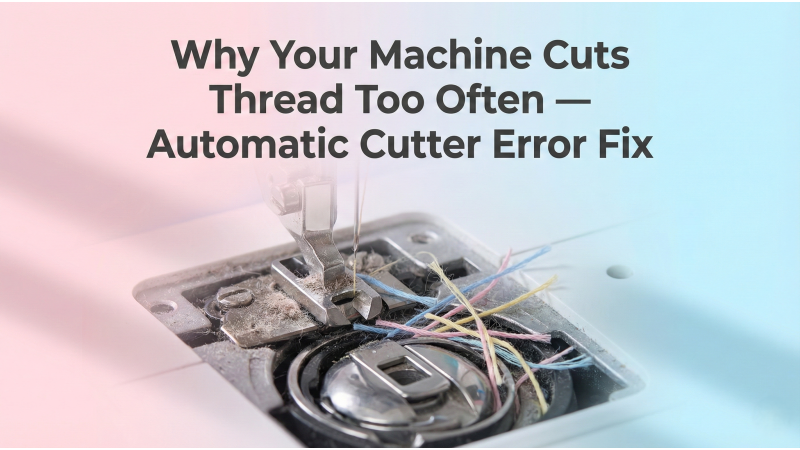
Why Your Machine Cuts Thread Too Often — Automatic Cutter Error Fix
Is your embroidery machine cutting the thread too frequently, even when it should continue stitching? Automatic thread cutters save time, but when they malfunction, they can interrupt designs, cause missed stitches, and create unnecessary stops. This guide explains why this happens and how to fix the issue for smooth stitching.
What Causes Automatic Thread Cutting Problems?
Most thread cutter issues come from mechanical misalignment, tension imbalance, clogged lint, or incorrect settings in the machine. Understanding why the machine cuts too often helps prevent thread breaks, birdnesting, and design interruptions.
According to Rancher Expert, the most common causes include a misaligned blade, worn components, incorrect tension, or dirt blocking the cutter mechanism.
1. Misaligned Thread Cutter Blade
A misaligned blade can trigger unnecessary cuts. The cutter may not fully retract or may move at the wrong time, tricking the machine into thinking the thread needs trimming.
- Check if the thread cutter blade moves smoothly
- Listen for scraping or clicking sounds
- Reset or recalibrate the cutter mechanism if your model supports it
If your machine requires internal adjustment, a technician may need to realign the blade angle or the cutter motor.
2. Lint or Debris Blocking the Cutter
Clogged lint is one of the top reasons why the cutter activates incorrectly. As noted in the Rancher Expert guide, dirt buildup around the blade, gears, or cutter housing can confuse the machine’s sensors.
To fix this:
- Remove the needle plate
- Clean underneath with a brush
- Inspect the cutter area for thread fragments
- Clean the bobbin case cavity
Regular cleaning keeps the cutter from engaging at the wrong time.
3. Upper or Bobbin Tension Problems
Incorrect thread tension can cause the machine to think the thread has broken, triggering an automatic cut. Uneven stitches, looping, or slack thread may activate unnecessary trimming.
The Just Fabrics manual explains how incorrect bobbin tension can also lead to repeated cutter activations.
- Make sure upper tension is balanced
- Check bobbin tension using your model’s guide
- Use the correct bobbin type
4. Auto Thread Cutting Setting Turned On by Accident
Some machines offer built-in settings for automatic trims between color changes, short jumps, or at stitch end. If these settings are activated, the machine may cut thread more often than expected.
The Just Fabrics manual provides detailed instructions on disabling auto-cutting in certain models.
- Go to machine settings
- Check automatic trim options
- Turn off jump-stitch trimming if not needed
5. Motor or Sensor Problems
Some auto cutter systems use sensors that detect thread tension changes. If sensors malfunction, the machine may trim too early or too frequently.
In these cases, professional service may be needed to clean, reset, or replace the affected sensor.
6. Design-Specific Over-Cutting Issues
Some downloaded designs include trim commands embedded by the digitizer. If your machine follows every trim command, it may appear to cut too often.
You can open the file in software such as:
- Hatch Embroidery
- Wilcom
- Embrilliance
Check if the design includes unnecessary trims. Removing or reducing trim commands improves stitching continuity.
7. Knots, Thread Snags, and Thread Drag
If the thread encounters resistance, the machine may assume it is broken and trigger a cut. Common causes include:
- Thread stuck on spool cap
- Dirty thread guide
- Incorrect thread path
Always check that the thread flows smoothly through every guide and tension point.
When Should You Turn Off Automatic Thread Cutting?
According to EMBROIDERY-PRO, automatic thread cutting is not ideal for all fabrics or stitch types. In delicate or thick fabrics, cutting too often can weaken the material or cause loose thread tails.
You may want to disable auto cutting when:
- Working with heavy fabrics
- Running satin borders or long fills
- Using metallic or delicate thread
When to Seek Repair Service
If your cutter keeps trimming despite cleaning, adjusting tension, or turning off auto-trim settings, the machine may have a mechanical fault. Cutter motors, gears, or linkage components sometimes require replacement.
A qualified technician can inspect for mechanical wear, faulty sensors, or damaged cutter blades.
Final Thoughts
Frequent thread cutting is usually caused by blade misalignment, cutter contamination, incorrect tension, or wrong machine settings. By cleaning the cutter area, checking tension, and adjusting your auto-trim preferences, you can prevent most unwanted cuts.
For more embroidery design resources and troubleshooting help, visit EmbDesignTube.
Related Products

Leave a comment