





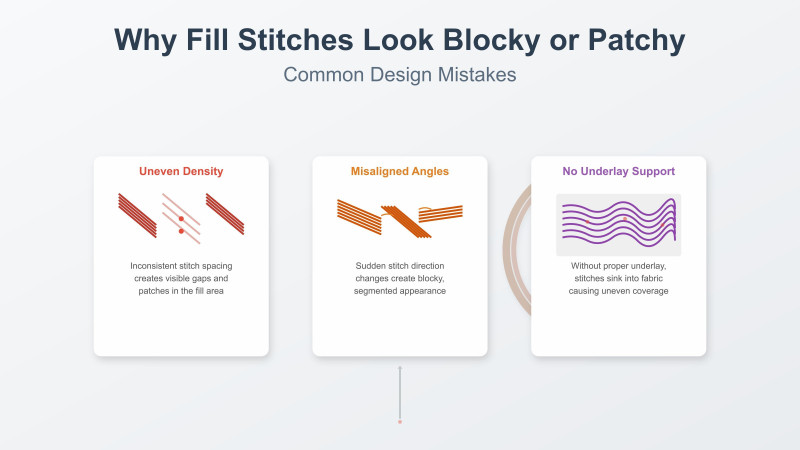

Why Fill Stitches Look Blocky or Patchy — Common Design Mistakes
Fill stitches are the backbone of large embroidery areas. When digitized correctly, they create a smooth, even surface that gives designs a professional finish. But when things go wrong, fill stitches can become blocky, patchy, or uneven—and the entire design loses its polish. Many of these issues come from digitizing choices, stabilizer problems, tension errors, or fabric movement. Guides like this embroidery mistake breakdown by TrueDigitizing explain how simple missteps can impact stitch quality, and videos such as this fill-stitch troubleshooting tutorial visually demonstrate how patterns and angles affect coverage.
Below, we explore the most common causes of patchy fill stitching and how to fix them using proven techniques. This guide also integrates expert resources so you can understand fill stitch behavior from multiple perspectives.
1. Incorrect Density Settings
Density determines how closely fill stitches lie next to each other. Too low of a density leaves visible gaps between rows, creating a patchy look. Too high a density, on the other hand, overloads the fabric, causing clumping and blockiness—especially visible on softer fabrics.
Fix: Use balanced density that suits your fabric type. If you want to see examples of density mistakes, the detailed explanations at DigitizingUSA’s digitizing mistakes guide explain how density affects fill quality in real-world designs.
2. Poor Underlay Setup
Underlay is the foundation that keeps fill stitches stable. Weak or missing underlay causes the top layer to sit unevenly, producing a rough or patchy appearance. Underlay also controls fabric movement during stitching.
Fix: Use zigzag or edge-walk underlay for stability. For more advanced underlay structure examples, the article at NKEMB’s common digitizing mistakes post offers a technical perspective on underlay errors and their visible results.
3. Incorrect Stitch Direction
Stitch angles influence how thread lays over the fabric. Harsh or random changes in angle force the fabric to shift, causing uneven coverage. Directional breaks are one of the top reasons fill areas look choppy.
Fix: Use smooth directional flow with gradual transitions. Watching how experts map fill directions—like in this stitch-direction tutorial—helps you visualize how angles affect texture.
4. Poor Compensation Settings
Pull compensation ensures fill stitches cover edges properly. Too little compensation creates gaps along borders, giving the fill a hollow or incomplete look. Too much compensation makes edges heavy and uneven.
Fix: Slightly increase pull compensation to eliminate border gaps. Compensation mistakes are also covered in this digitizing frustration fix guide, which walks through proper settings for different fabric types.
5. Using a Low-Quality Fill Pattern
Some fill patterns are too repetitive or too light for certain fabrics. Designs digitized with low coverage patterns may appear thin, especially on textured, stretchy, or dark fabrics where fill gaps are more visible.
Fix: Choose a pattern with better coverage or adjust the stitch angle. If you want to compare real fill patterns in action, this embroidery fill technique video shows how different repeat patterns behave on fabric.
6. Fabric Movement During Stitching
If the fabric shifts—due to poor hooping, loose tension, or insufficient stabilizer—the fill stitches will land unevenly, creating patchy segments and distortions. Movement exaggerates every digitizing flaw.
Fix: Hoop tightly and use stabilizer appropriate for the material. Issues like these are demonstrated clearly in this fabric movement and distortion video, which shows how even slight shifting ruins fill consistency.
7. Wrong Stabilizer or Insufficient Stabilization
The stabilizer acts as the backbone of embroidery. Weak stabilizers allow fabric to bounce or sink, making fill stitches spread out, break, or appear rough. Too-light stabilizers also cause visible holes between fill rows.
Fix: Use cut-away stabilizer for knits and tear-away for firm woven fabrics. For deeper troubleshooting, this stabilizer comparison and troubleshooting video helps show which stabilizer performs best under fill stitching.
8. Incorrect Thread Tension
Too-tight tension stretches stitches and creates gaps. Too-loose tension creates looping, uneven fills, and thread slippage. Tension issues are often misdiagnosed as density problems.
Fix: Adjust tension in small increments and test frequently. Tension problems are frequently listed among the top digitizing issues in TrueDigitizing’s embroidery mistakes guide, reinforcing their impact on fill quality.
9. Low-Quality Digitizing Files
Random stitch angles, poor pathing, abrupt transitions, and unoptimized underlay all lead to patchy fills. Even premium artwork cannot fix poor digitizing choices. Common flaws include start/stop confusion, overlapping fills, and misaligned travel runs.
Fix: Use professionally digitized files or revise fill areas in your software. Digitizing issues like these are detailed in DigitizingUSA’s blog, making it easier to understand how proper pathing affects fill smoothness.
10. Machine Speed Too High
High-speed stitching causes vibration, needle deflection, and inconsistent penetration. Fill stitches require stability to maintain smooth surface coverage. Too fast a speed makes stitches land unevenly.
Fix: Slow down significantly for large fill areas. This reduces vibration and helps stitches lay flatter and more uniform.
Conclusion
Patchy or blocky fill stitches are usually caused by density mistakes, underlay weakness, fabric instability, or poor digitizing structure. By controlling stitch direction, balancing density, choosing proper stabilizers, and adjusting tension, you can achieve clean, smooth, and professional-looking fill surfaces. Using educational resources—from expert blogs like NKEMB to demonstration videos such as stitch direction guides—ensures you continue improving your embroidery results with every project.
Related Products

-350x350h.jpg "10 Indian Paisley Floral Motif Embroidery Designs Set")

-350x350h.jpg "Indian Folk Art 15 Kalamkari Embroidery 5 Inch Design Pack")

-350x350h.jpg "10 Floral Paisley & Ornamental Motif Embroidery Pack (4x4)")

-350x350h.jpg "6 Inch Ornamental Foliage Crest Motif 10 Embroidery Designs Set")

-350x350h.jpg "10 Indian Ethnic Crest 4 Inch Floral Motif Embroidery Pack")
Leave a comment